
Best Password Management Software in
Are you looking for Password Management Software for your Business in ? SaaS Adviser brings you the best Password Management Software to ease your worries. In order to make your work smooth and swift, SaaS Adviser has compiled a list of the best software available. Compare the Best software features, pricing, free demo, and trial to select the best Password Management Software for your organization.
 Researched and Written by Akash Patel
Top 3 Featured Softwares


List of Top Password Management Software
Get Free Consultation

Zoho Vault is an online password management software that is best for teams. It secures, stores, shares, and manages all your passwords from anywhere in the most organized and secu...
View Profile
1Password is a highly secure password management solution designed to help individuals and businesses store, manage, and protect their sensitive data in an encrypted digital va...
View Profile
Passpack is a cloud-based password management solution designed to securely store, manage, and share passwords and sensitive information. Tailored for both individuals and business...
View Profile

NordPass is a password manager that stores all complex logins and credentials and lets users access them from anywhere. It easily remembers all passwords, auto-fills online forms...
View Profile

RoboForm is a highly secure and automated software designed for password management. It can be applied on various devices and platforms and addresses all critical points requir...
View Profile

KeeperPasswordManager
Forgot your password?Strong password management, enforcement, and administration across all employee logins, apps, and websites are critical functions of Keeper, a password security and management plat...
View Profile

Dashlane for Business
THE SECURITY-FIRST PASSWORD MANAGERDashlane is a mobile and online application that streamlines password management for individuals and companies. We enable businesses to safeguard the information of their clients a...
View Profile

Bitwarden

By Bitwarden
Bitwarden is the easiest and safest way for teams and individuals to store and share data from devices. This AI-based manager makes sure that users’ private information is protec...
View Profile

LastPass is a password management software that stores your passwords online and prepopulates them automatically when needed. It uses AES-256 bit encryption to store your passwords...
View Profile

LogMeOnce
By LogMeOnceCheck How LogMeOnce can help to automate Indian Business. SaaSAdviser provide their list of features, pricing, Free demo and Comparison with the best alternative
View Profile
Sticky Password is an amazing password manager and form-filler. It perfectly remembers the user's passwords and submits them automatically wherever and whenever they need them on...
View Profile
Enpass is a cross-platform, offline password management software that automates the login process while keeping login information secure. It uses an open source AES encryption en...
View Profile
Bitdefender Total Security
Your Total Digital Protection: Complete Security and Essential Privacy
Bitdefender Total Security is a comprehensive cybersecurity suite designed for multi-device households and individuals. It supports major platforms including Windows, macOS, A...
View Profile

Specops Password Policy
By Specops SoftwareCheck How Specops Password Policy can help to automate Indian Business. SaaSAdviser provide their list of features, pricing, Free demo and Comparison with the best alternative
View Profile
TeamPassword is a password management tool that stores and shares team logins and passwords. With TeamPassword, you can access and manage passwords from the web, your desktop, la...
View Profile
Passbolt is a secure password manager platform that is completely open source and is aimed at improving the information security of your business. It assists the organizations in...
View Profile

Okta is an identity and access management software that connects suppliers, partners and customers of an enterprise securely within a single loop, providing great user experience...
View Profile

ManageEngine Password Manager Pro is an enterprise-grade privileged access management (PAM) solution designed to securely store, manage, and monitor sensitive credentials acros...
View Profile
Duo Security
By Duo Security
Duo Security is a cloud-based trusted access provider, protecting thousands of organizations worldwide, including Dresser-Rand Group, Etsy, Facebook, K-Swiss, Paramount Pictures,...
View Profile

Keeper is a password management software that provides a strong guard on the safety and security of all your passwords in one single vault. It uses two-factor authentication, AES e...
View Profile

Table of Content
What is Password Management Software?
Dealing with numerous passwords safely in the modern digital environment is a challenging task. That is where Password Management Software in USA comes in. It facilitates companies and individuals, enabling them to store, organize, and autofill passwords with security, thus decreasing the chances of becoming victims of breaches. It serves as a password manager software by actively functioning as a passwords manager account, which means that it helps users in creating and storing strong passwords within an encrypted vault. Quite a few solutions also offer multi-factor authentication and secure sharing, so they are a must-have for businesses dealing with sensitive information.One more thing to note is that some password managers behave like identity management software by ensuring proper access to crucial accounts while at the same time fighting cyber threats.But which one is the best for you with this variety of new choices to get? There are many things to think about before making a purchase. This buyer’s guide is here to show you how to pick the perfect product that is compatible with your requirements.
1. Related Article For Payroll Software
2. Conclusion
It is important to select the right password management software to secure sensitive business data from unauthorized access and to set up and streamline the access control procedures. Suppose you are the tech-savvy kind who especially likes that cloud-based convenience, strong desktop-level security, browser integration, and the speed of the single-sign-on process are the ways in which you can enjoy quality password managers for business.Are you trying to figure out which one is more suitable for your business needs? SaaS Adviser is a company that assists businesses in finding the best password management software for them, keeping in mind their security requirements. Let us be your guides while you choose the perfect solution for the protection and productivity you want. Do not waste another second and contact us today to take your company to the next level!
3. Latest Market Trends in Password Manager for Business
The password management software market is changing very fast while businesses are focused on security and access control. Cloud-based password manager programs are getting more and more consistently suggested by many in IT, partly because they are flexible and scalable, and lately, they easily integrate seamlessly with security systems.
A significant change in the sector arises with the use of passkeys that have been embedded in a software solution for password managers. Firms now are also paying attention to identity management by the time companies buy appliances to manage access in a secure way, especially under the growing environment of AI-powered technologies.
Compliance with the rules and regulations related to security is also an essential precondition, as establishments are looking for a secure password manager for business means which would enable them to meet the data security requirements and avoid the risks of any abuse. To mitigate the risks that come along with an increased frequency of successful attacks as a result of inadequate security measures, businesses need to keep account and invest in even more advanced programs for password managers to ensure top-notch digital security.
4. What are the Different Kinds of Password Managers?
Choosing the best password management software that can meet the required needs, security issues, and desirable usability is a principal factor one must pay attention to. The following are four examples of password manager programs for businesses and individuals:
1. Cloud-Based Password Managers
Most password manager software is encrypted passwords stored in protected cloud servers that can be accessed over any device with an internet connection. They offer real-time synchronization, and this makes them more useful for companies which have several accounts all over different platforms. On the contrary, they depend on strong encryption and multi-factor authentication to ensure security.
2. Desktop Password Managers
Whereas cloud-based systems keep data on a server in the cloud which can be accessed remotely, a desktop password manager for business applications is when information is kept locally on a specific device. They offer a higher level of security by not keeping data on the internet, thus they reduce the risk to cyber threats. In the meantime, users have to be content with accessing the software on the device where it is installed making it less convenient for multi-device users.
3. Browser-Based Password Managers
Most of the current web browsers are bundled with password management software that remembers passwords and log them in automatically. The use of such tools might sound good, yet they lack certain securities such as a virtual vault and encryption, hence, they are somewhat less safe than stand-alone password manager programs. These systems are enough for the basic storage of passwords although they might not truly be the best for business purposes.
4. Single Sign-On (SSO) Solutions
SSO is a technology that allows companies to their employees access all their apps by using the same credentials. It improves the proper management of the data and makes it hard for others to get there, regarding your passwords. Through this, employees can feel more confident and secure as well. SSO works best for most companies, but they require a strong security policy to restrict access.
5. Features of Password Manager Programs in USA
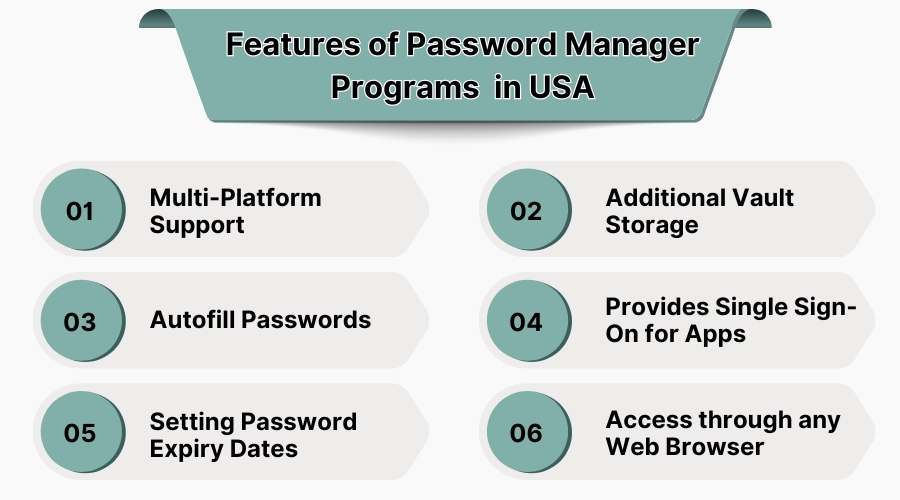
Password management software could either ease or intensify security threats resulting either from the process of hacking people's accounts or from the employees' theft of secure credentials. The accurate password manager for businesses will help you find an effective balance between security and ease of use. Look into the key features to consider for a password manager to handle for the business as follows:
1. Multi-Platform Support
In my view, a good account program for passwords manager can function on any device - for instance, desktops, smartphones, and tablets. Being able to log in automatically is a necessary part of getting that done if your team is of the Windows, macOS, or mobile app users.
2. Additional Vault Storage
Advanced password manager programs offer secure storage for sensitive documents, payment details, and authentication codes, acting as an account program for passwords manager beyond just login credentials.
3. Autofill Passwords
Speed up logins with an autofill feature that securely enters credentials into websites and apps. This not only saves time but also reduces the risk of keylogging attacks.
4. Provides Single Sign-On for Apps
A powerful password manager for business includes Single Sign-On (SSO), which enables workers to get to numerous programs with a single, secure login, which in return pilots security and productivity.
5. Setting Password Expiry Dates
For businesses handling sensitive data, setting password expiration policies ensures users update credentials regularly, maintaining high security standards.
6. Access through any web browser
User can securely access their passwords from any browser by utilizing cloud-based password manager software and thus enabling the flexibility and the security on the side of the users.
6. Five Best Password Manager Software in USA
Check out these five leading password manager programs in USA, each having their own unique features, advantages, disadvantages, and pricing details.
1. NordPass
NordPass, a product designed by the same team that developed NordVPN, is made secure by uncompromising security features coupled with an easy-to-use interface, making it a go-to option for both personal and business use.
Features
-
Zero-Knowledge Architecture that ensures that only you can access your stored data.
-
(MFA) Multi-factor authentication adds an extra layer of security to your account.
-
Data Breach Scanner which alerts you if your credentials have been compromised.
-
Secure Password Sharing allows safe sharing of passwords with trusted contacts.
-
Seamlessly syncs data across multiple devices.
Pros
-
User-friendly design and suitable for all user levels.
-
Provides 24/7 customer support, including live chat.
Cons
-
Lacks some advanced features found in competitors.
-
Premium plans can be pricier compared to other options.
Pricing
-
Free Plan: Limited features for one user.
-
Premium Plan: Starts at $1.24/month (2-year plan).
-
Family Plan: Begins at $2.68/month (2-year plan) for up to 6 users.
2. RoboForm
RoboForm is a best choice for its unmatched features to fill forms with the highest level of security and its low cost, making it the app for many who are looking for both, form filling and the best price.
Features
-
Advanced Form Filling: Accurately fills out complex web forms.
-
Password Audit: Evaluates the strength of your passwords.
-
Secure Sharing: Allows encrypted sharing of credentials.
-
Emergency Access: Grants trusted contacts access in emergencies.
-
Bookmark Storage: Saves and organizes bookmarks securely.
Pros
-
Highly affordable pricing structure.
-
Comprehensive form-filling features.
Cons
-
User interface may seem outdated to some.
-
Limited advanced security features compared to competitors.
Pricing
-
Free Plan: Basic features with unlimited passwords.
-
Premium Plan: Starts at $0.99/month.
-
Family Plan: Approximately $3.98/month for up to 5 members.
3. Bitwarden
Bitwarden providing services of password management for business free to use an open-source platform is a token of its authenticity and strong security options most probably scalable to attract even the individual user and the organization as well.
Features
-
End-to-End Encryption: Ensures complete data protection.
-
Self-Hosting Option: Allows businesses to host data on their servers.
-
Secure Password Generator: Creates strong, unique passwords.
-
Two-Step Login: Enhances account security with additional verification.
-
Cross-Platform Accessibility: Available on various devices and browsers.
Pros
-
Transparent open-source platform.
-
Competitive pricing with a comprehensive free plan.
Cons
-
User interface could be more intuitive.
-
Some advanced features require a premium subscription.
Pricing
-
Free Plan: Includes unlimited passwords and devices.
-
Premium Plan: $10/year per user.
-
Family Plan: $40/year for up to 6 users.
4. Enpass
Enpass is perfect for those who want to buy it only once and not have recurring subscriptions because it is safe and has good functions.
Features
-
Local Data Storage stores data locally, giving users full control.
-
Cross-Platform Support compatible with multiple operating systems.
-
Password Audit feature Identifies weak and duplicate passwords.
-
Provides encrypted backups of your data.
-
Biometric Unlock in it Supports fingerprint and facial recognition.
Pros
-
One-time purchase option available.
-
No subscription required for premium features.
Cons
-
Lacks cloud synchronization without third-party services.
-
User interface may not be as polished as competitors.
Pricing
-
Free Plan: Basic features with limited vault items.
-
Premium Plan: One-time purchase of $79.99 for lifetime access.
5. KeePassXC
KeePassXC, the open-source, is a community-driven password manager that stands out because of its advanced security options and wide-range customization features.
Features
-
Utilizes AES-256 encryption for data protection.
-
Cross-platform Compatible helps make work on Windows, macOS, and Linux.
-
Allows customization through plugins.
-
Portable Mode: Can run from USB drives without installation.
-
Two-Factor Authentication
Pros
-
Completely free and open-source.
-
Highly customizable with various plugins.
Cons
-
Requires manual setup and configuration.
-
No official cloud synchronization; relies on third-party solutions.
Pricing
-
Free: Entirely free to use with all features included.
7. Benefits of Password Management Software
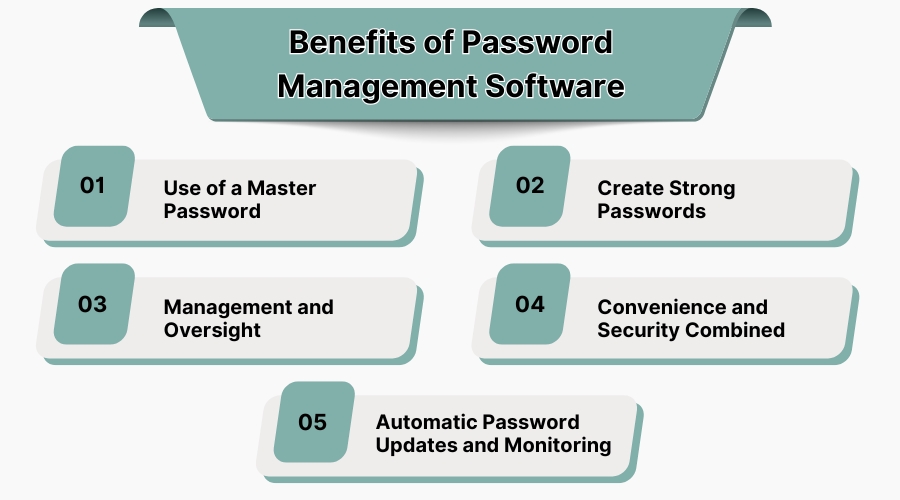
Data protection is a top priority in the digital world. It is a great tool that not only businesses but individuals can also use to secure their accounts easily. Here are the Key Benefits for Businesses:
1. Use of a Master Password
Password manager programs allow users to bypass the hassle of storing and remembering multiple complicated passwords. With a single master password, users are assured of the complete security of all entries they store, thus decreasing the probability of either forgetting or reusing insufficient passwords.
2. Create Strong Passwords
Weak passwords are a hacker’s best friend. Password manager software generates strong, unique passwords for every account, minimizing the chances of unauthorized access.
3. Management and Oversight
Businesses need visibility into password usage. A reliable computer security software provides centralized management, enabling IT teams to enforce security policies and track access activity.
4. Convenience and Security Combined
It is very important to keep a balance between the security and the usability. The password manager programs are the very important tools to save and coordinate the user credentials in an autofill way, which makes login quicker without the risk of losing the security of the data.
5. Automatic Password Updates and Monitoring
With cyber threats constantly evolving, password manager software offers automatic password updates and breach monitoring. It alerts users about compromised passwords, ensuring proactive security measures.
8. Challenges in Password Manager for Business
The use of a Password Management Software is necessary for the protection of company data, but it is accompanied by many drawbacks. Let us see some of the main issues companies have using a password manager for business and how to cope with them.
1. The Master Password
A password manager software relies on a single master password for access. If employees forget it or use a weak password, the entire system becomes vulnerable. Implementing multi-factor authentication (MFA) and secure recovery options is crucial.
2. Insecure Password Usage
Users may still save sensitive information on their computers. They can also distribute passwords in unsafe ways or use weak passwords several times. Nonetheless, frequent security education and the application of stringent password policies contribute to the decrease in threats.
3. Losing access to the password manager
If the admin loses access, recovering stored credentials can be a challenge. A cloud security software with admin recovery options and backup access methods ensures businesses don't get locked out.
4. Password Manager Safety
Businesses often worry about their data leaking; thus, they don’t want to store their passwords in one place. A password manager that is encrypted as well as with zero-knowledge security and breach-monitoring serves the purpose of being the best option for selecting among the rest which takes the least risk of an unauthorized person having access to the vital information that’s stored in the company
5. Locked Out Recovery
If employees or admins get locked out, resetting access should be simple yet secure. Reliable password manager programs offer emergency access options without compromising security.
9. Criteria for Selecting the Right Password Management Software
Selecting the correct Password Management Software in USA is vital for protecting sensitive data and the efficient handling of the access management and therefore needs to be carefully thought out. How to make the best choice is provided below:
1. Consider Your Needs
Every business has specialized security needs. Do you require password manager for business that allows team management, role-based permissions, or two-factor verification measures? Check the features that you cannot do without before starting your search.
2. Take Multiple Demos and Analyze
Don’t settle for the first option you see. Test different account programs for password managers to compare security features, ease of use, and integration capabilities. A hands-on approach ensures you pick software that aligns with your workflow.
3. Negotiate and Select the Best Fit
Once you shortlist the best solutions, negotiate pricing and custom features to get the most value. A well-chosen password management software not only secures your credentials but also enhances efficiency.
