
Best Asset Management Software in
Are you looking for Asset Management Software for your Business in ? SaaS Adviser brings you the best Asset Management Software to ease your worries. In order to make your work smooth and swift, SaaS Adviser has compiled a list of the best software available. Compare the Best software features, pricing, free demo, and trial to select the best Asset Management Software for your organization.
 Researched and Written by Akash Patel
Top 3 Featured Softwares

List of Top Asset Management Software

Get Free Consultation

Monday.com Service

Transform your service operations from reactive to proactive
Empower service teams to deliver exceptional support experiences faster with smart automations that leverage the power of AI.
View Profile

Precoro is a comprehensive procurement and spend management software designed to help businesses streamline purchasing processes, enhance budget control, and improve overall financ...
View Profile

What is Freshservice? Freshservice is a cloud-based IT service management (ITSM) solution developed by Freshworks that enables organizations to modernize and streamline their IT...
View Profile
Verizon Connect
Fleet management software to help move your business forward
What Is Verizon Connect?Ver Read More...
View Profile
Motive
Empowering the people who run the physical economy
Motive Technologies, Inc. (formerly known as KeepTruckin) is a technology company that provides an integrated platform aimed at enhancing the safety, productivity, and profitab...
View Profile
Azuga Fleet
End-to-end fleet management solutions.
Azuga Fleet is a cloud-based total fleet management and GPS monitoring software designed to help groups enhance vehicle monitoring, motive force protection, and operational perform...
View Profile
VidCruiter is a comprehensive recruitment software platform designed to streamline and enhance the hiring process for organizations of all sizes. Founded over a decade ago, Vid...
View Profile
Zoho Desk is a cloud-based help desk software developed by Zoho Corporation, designed to assist businesses in managing customer service operations efficiently. It consolidates cust...
View Profile

ManageEngine ServiceDesk Plus
Design, automate, deliver, and manage critical IT and business services
 4.2
4.2
ServiceDesk Plus is the industry-leading ITSM platform that helps IT teams automate every aspect of their service delivery with powerful workflows. From incident and problem ma...
View Profile
What is Atera?Atera is an all-in-one remote monitoring and management (RMM) platform designed for IT professionals and managed service providers. It integrates essential to...
View Profile
Front is a dynamic customer communication platform designed to streamline team collaboration and enhance efficiency in managing customer interactions. By blending the familiari...
View Profile
What is Teamwork?Teamwork is a challenge management and collaboration software program designed to help teams prepare duties, control initiatives, and enhance productivity. Ide...
View Profile

PureVPN is a web-based virtual private network software that shields users against 3rd party spying on their digital resources online. This software also ensures optimum protection...
View Profile
What is Zoho Assist?Zoho Assist is a far off computer software program that permits you to get entry to and support devices from anywhere in the global. With features like unattend...
View Profile
What is Emburse Certify? Emburse Certify is a cloud-based Expense Management Software designed to simplify and automate the way organizations...
View Profile
Surfshark is a top-tier virtual private network (VPN) service that enhances online privacy, security, and freedom. It encrypts internet traffic, hides users’ IP addresses, and al...
View Profile

Emossy
Employee Engagement Made Easy!What is Emossy?Emossy is a modern, cloud-based Employee Experience and HR Management platform designed to digitize and simplify core HR functions such as onboarding, attendance...
View Profile
Ant My ERP
Improve Business. Improve LifeOur unique, all-in-one solution provides complete visibility, coordination and control of all aspects of your business. With Ant My ERP , every employee -- from the CEO to the fiel...
View Profile

Extensis Portfolio is a digital asset control (DAM) software designed to assist groups in preparing, shopping, and retrieving virtual documents effectively. It is an essential hub ...
View Profile

ORGTraq
Run Your Entire Organization with One Business Tool
An integrated SaaS-based business management software that works with different departments and ensures productivity and employee responsibility, accounting and finance.
View Profile

Table of Content
1. What is Asset Management Software?
The manual monotonous task of managing assets can be implemented with the best asset management software (AMS) that seamlessly tracks and manages your asset-related activities. In business, managing assets requires a systematic process to purchase, sell, or upgrade assets. The software for asset management helps businesses proficiently with planning, acquisition, operation, administration, maintenance, and other activities.
1. Conclusion:
Choosing the best asset management software with the best features enhances your business productivity, efficiency, and growth with customer satisfaction. The feature-rich asset management system maximizes your asset’s long-term value by aligning them to the purpose and objectives of your business. You can easily comprehend the asset lifecycle using the software for asset management in making strategic financial planning and fruitful decisions for the future growth of your business.
2. How to Select the Best Asset Management Tools?
When it comes to choosing the most beneficial asset management tools, it requires you to consider various aspects as shown below.
1.Comprehend the Lifecycle of the Assets
- Understand the assets’ lifecycle to know that the software can accomplish your business needs effectively.
- Detailed planning (Asset’s need, purpose, benefits, budget, depreciation cost, and approx. time for its operational life and many others),
- Acquisition (identify services, shortlist suppliers, cost negotiations, delivery, finalize buying),
- Giving access to different departments for sharing responsibilities, regular monitoring during their operations, and maintenance for the best performance
- Finally, disposal is either repurchased, sold, replaced, or recycled.
2.Set Your Expectations
Consider all key factors that your business wants to achieve using this system by arranging business meetings with expert and efficient team members. Set your short and long-term business goals that identify the precise needs of the asset management software that best suits your organization’s setup, budget, objectives, and operational needs.
3. Examine Ratings & Reviews
Users’ reviews are important factors to think about when buying any software to know its pros and cons and user experience by considering authentic ratings of websites and users.
4.Check the Price
Ask your vendors to send a quotation that includes the cost of asset management software, initial set-up fees, monthly charges, and complete fee structure including licensing fees.
With increasing global needs for asset management systems, which is expected to grow by 2032 approximately USD 28.35 billion from USD 20.27 billion in 2023 due to outstanding benefits of asset management software. Thus, selecting the right asset management tools helps achieve achievements.
3. Key Features of Best Asset Management Software:
.jpg)
1. Asset tracking:
The best software for asset management needs to be compliant with different asset tracking systems like Bluetooth tracking, barcode, RFID, and others. Your free asset management software must support all devices and technologies they require such as an RFID scanner, barcode scanner, etc.
2. Real-time asset reporting:
After gathering your data, the advanced features of your asset management system ease your work by preparing reports based on your given criteria. Using the asset reports according to real-time asset information, you can quickly implement your asset-related business strategy and planning.
3. Asset check-in and check-out:
In your business, if your asset information needs to be tracked by multiple departments, the check-in and check-out of asset features help to easily administrate, monitor, and secure the system.
4. Cross-platform support:
When selecting the best asset management software free, ensure it supports different operating systems that facilitate your employees to update asset-related information from anywhere, even during their business trips.
4. Top 5 Asset Tracking Software
1. MaintainX
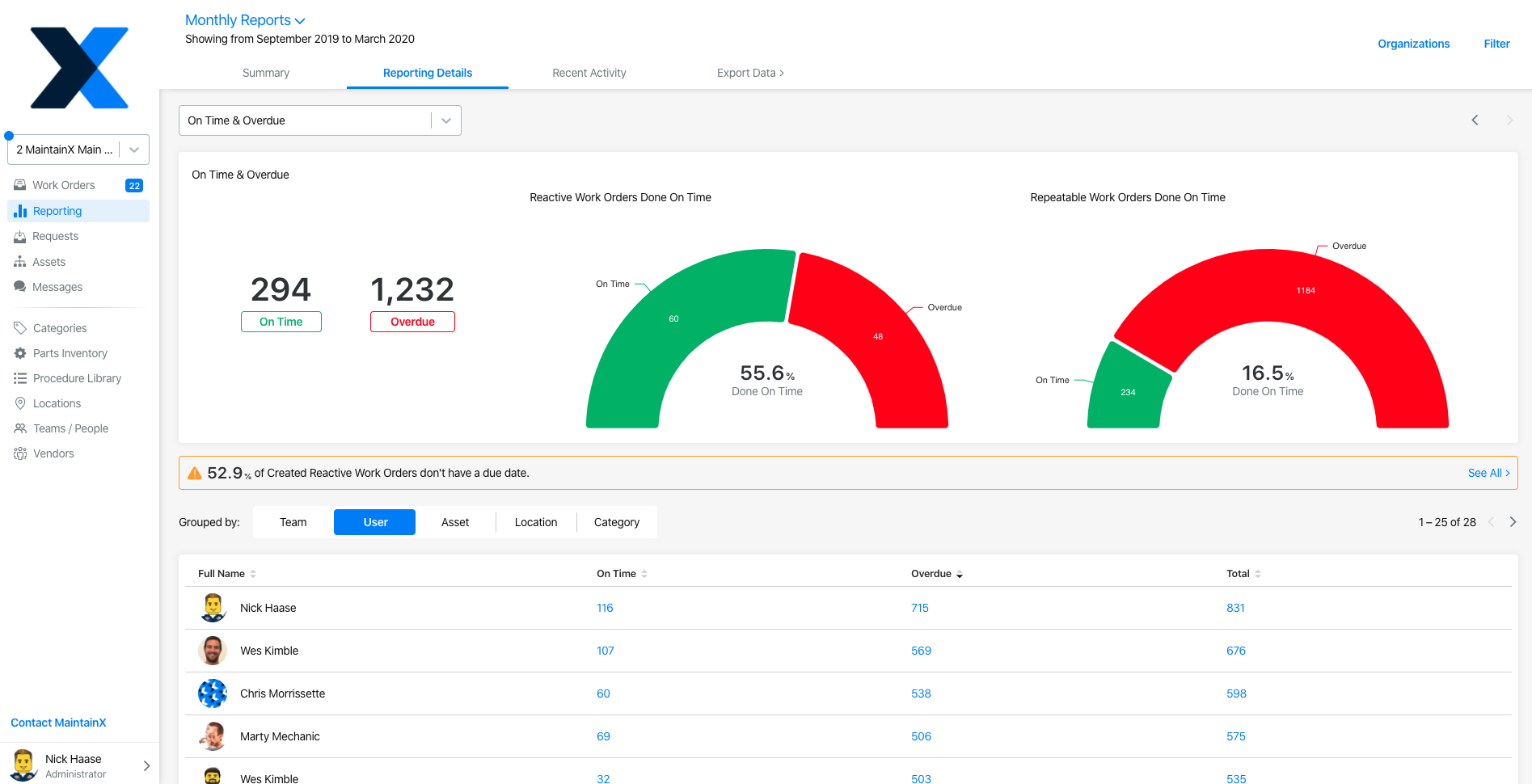
It’s a prominent asset maintenance platform that increases productivity by optimizing resource management and reducing frequent downtime. This AI-powered system assists frontline teams with data-driven insights, mobile accessibility, real-time tracking, updates, and smooth integration of your complex processes.
Features
- Work order Management
- Reporting & Dashboard
- Mobile Access, GPS tracking
- Maintenance Planning
- Approval & vendor management
- Barcode scanning
- Integration with other tools
Pros
- Easy to operate
- Best Customer Support
- Real-time updates
- Intuitive interface, mobile accessibility
- Reporting & Analytics
Cons
- Limited/missing features
- Lack of customization for workflows
- Problem with work orders
Price
- Basic - $0 per user/month [It’s a free plan for small teams looking to implement digital systems and track work orders.]
- Essential –$16 per user/month to pay annually and $ 21 per user/month to pay monthly [It’s ideal for teams who require easy and streamlined preventive maintenance.]
- Premium – $49 per user/month to pay annually and $59 per user/month to pay monthly [This plan helps enhance productivity with effective workflows and many more features.]
2. Smartsheet
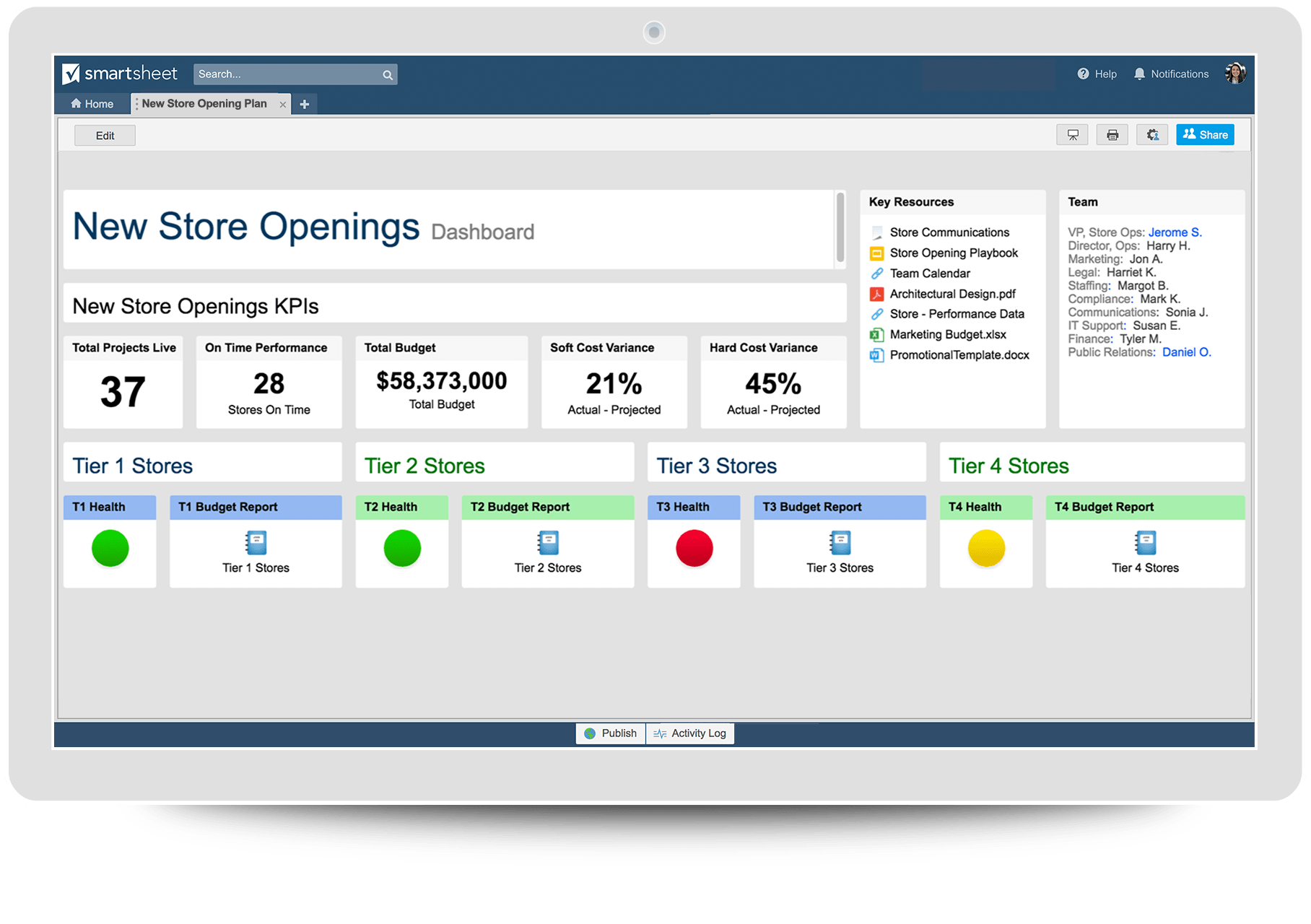
It’s a prominent enterprise SaaS-based collaboration solution for businesses that helps them to automate and manage their work proficiently. This enterprise solution makes it easy to operate spreadsheets with combined file sharing and is useful in streamlining and optimizing your asset management process.
Features
- Pre-built form, built asset inventory
- Ease tracking of locations and conditions in real-time using the dashboard
- Task management, Resource Management,
- File sharing, collaboration tools, and Integration
- Customizable workflows, Templates
Pros
- Simple and easy to operate
- Flexible and User-friendly interface
- Automated workflows
- Document generation
- Allows connecting with cloud tools like Office 365, Google G-Suite, DocuSign, Slack, and others without constant app-switching
Cons
- Lack of tabs
- Advanced features operation requires training to learn
- Unresponsive mobile app
Pricing
- Pro - $9 per Member/month, Billed yearly [1-10 Members, unlimited Viewers]
- Business - $19 per Member/month, Billed yearly [3+ Members, unlimited Guests and Viewers]
- Enterprise – Custom pricing [10+ members]
3. Asset Panda - Best for advanced inventory management
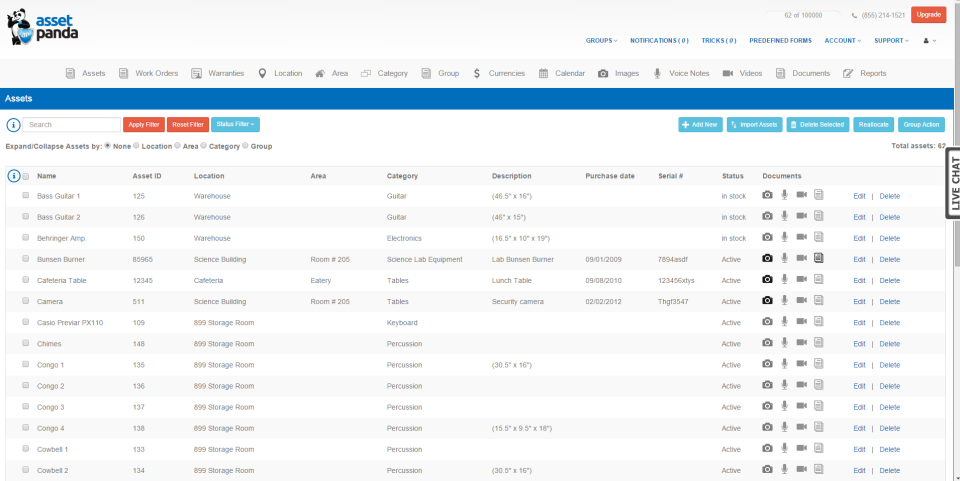
This all-in-one platform for asset management programs helps you track fixed assets, IT assets, and many others. It also comprises advanced inventory management techniques, which are most suitable for businesses with several SKUs.
Features
- Comprehensive asset management
- The best features include tool tracking, maintenance tracking, leased equipment tracking, and others.
- Customized for industries like, education, healthcare, government, construction, and more.
- Easy to operate, track, and manage your assets from anywhere, support web & mobile.
- Allow integration with Azure Active Directory, Zendesk, Google Workspace, Microsoft Active Directory, Okta, and others.
Pros
- Unlimited options for fields and configuration
- Asset kitting to bundle related equipment
- Protect sensitive information using role-based permissions
Cons
- The new user set-up process is time-consuming and complex
- Difficult for new users to learn quickly
Pricing
Get a quote on request
4. Freshservice - Best for managing IT assets and fixed assets
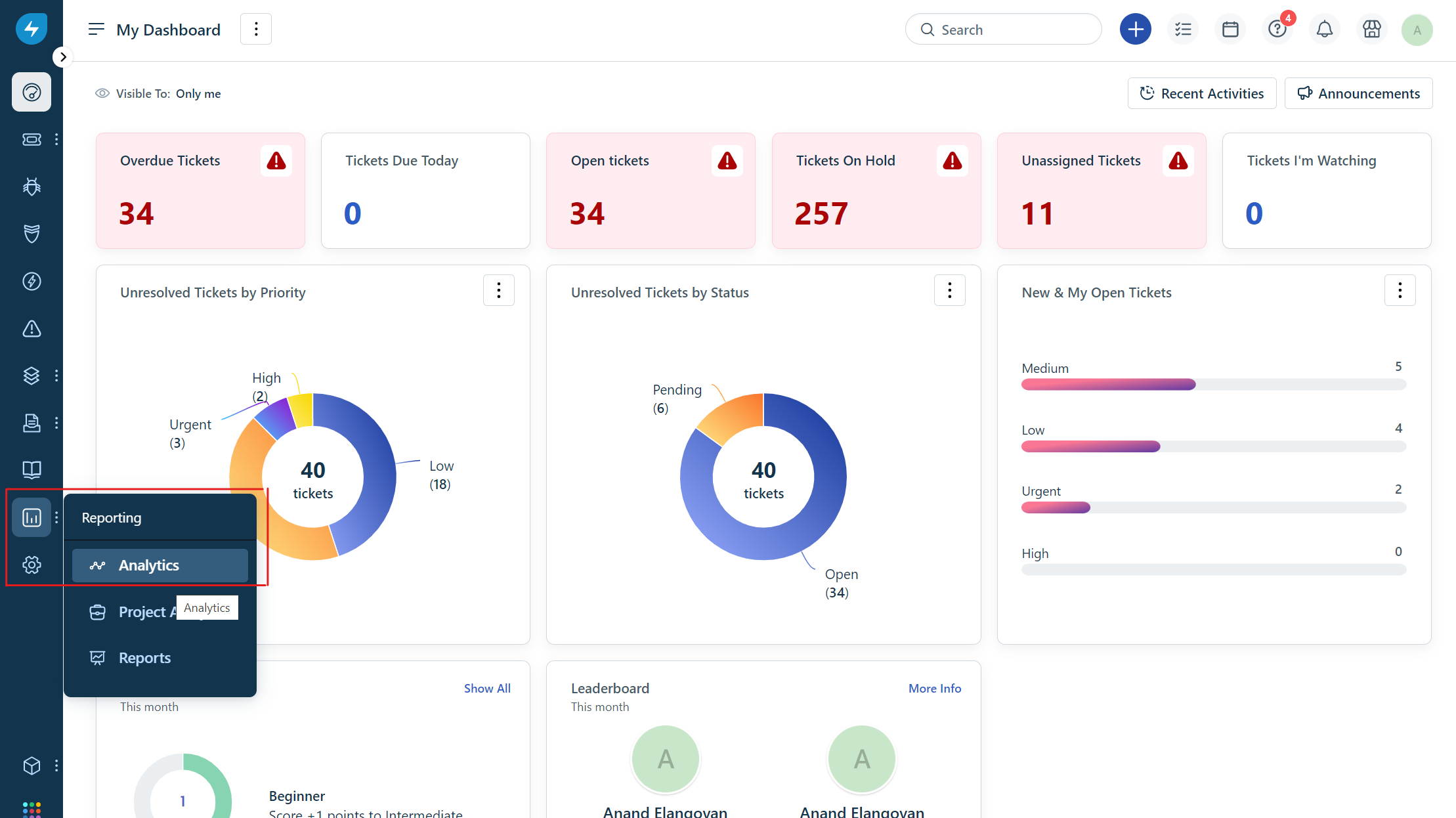
AI-based seamless solutions help you to efficiently manage all your IT assets and non-IT assets. Best known for its unmatched combination of scalability, built-in AI, usability, and value. It is one of the world’s leading asset management platforms, and best to keep its IT assets under control, like software, hardware, and fixed assets such as machines, vehicles, etc.
Features
- Inventory Management – to keep up-to-date information on all your assets
- Reporting & Analytics – custom reporting to make important decisions and monitor the system
- Contract Management – for speedy contract renewal and automated approval
- Workflow Automator – Built-in capabilities to eliminate your manual processes
- Mobile app for scanning assets on the go using a barcode scanner
- Integrate with Microsoft Intune, Azure AD, Jamf, and other IT apps
Pros
- Easy to operate
- Quick to deploy
- User-friendly interface
- Powerful features and integration
- Best services and support
Cons
- Costly software
- Lack of remote service integration
- API can be a little complicated
- Ticket problems
Pricing
- Starter - $19 – For getting started
- Growth - $49 - For growing businesses across their LOBs
- Pro - $99 – For Project Management for large organizations + ITSM + ITOM
- Enterprise – Get a quote for your custom requirements
A free trial is also available.
5.ServiceNow - All-in-One Package with Asset Management
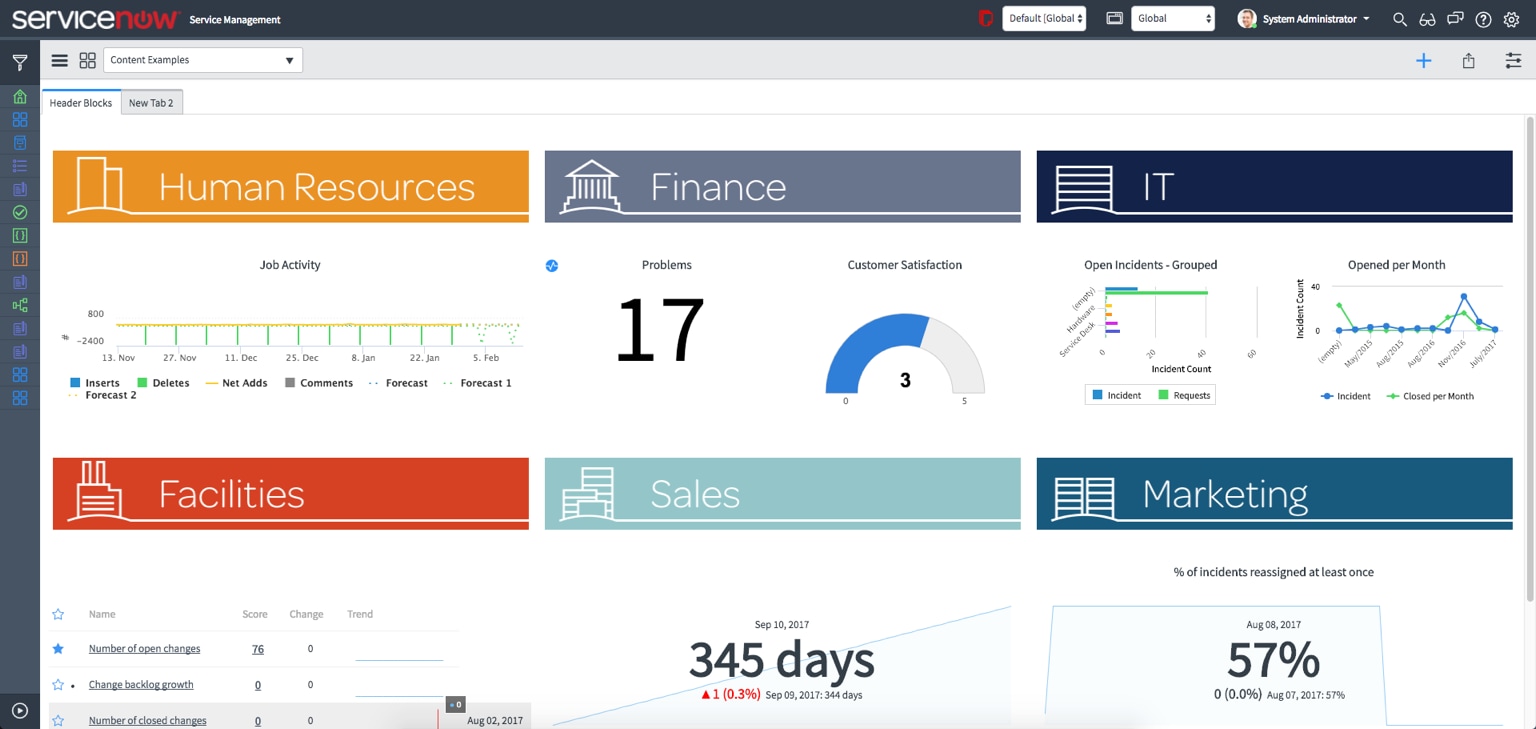
It is the best Asset Management Tool helpful for businesses to automate their asset management processes, reduce the risk of license compliance, improve costs, and account for all software, including non-virtual and virtual, throughout the lifecycle of software.
Features
- License management, contract management, and hardware asset management
- Workforce management
- Mobile Apps
- Customizable dashboards
- Robust Security
Pros
- Cost and Time savings
- Automation and workflow management
- Better vendor relationship management
- Easy audits, user-friendly interface,
- Cloud software usage control
- Seamless integration with other ServiceNow modules, robust functionality, and good customer support.
Cons
- Complex for beginners to navigate
- Require training or technical expertise for customization
- The migration process requires time
- Limited features in the mobile app
- Expensive compared to other software
Pricing
Contact for Custom Quotation
5. Benefits of Asset Management Software in USA:
.jpg)
1.Access Data Anywhere and at Any Time
Using the best asset management software in the USA, you can easily view all asset information, add or update, and more actions from anywhere at your suitable time and place.
2.Eliminate Manual Systems
Managing assets using manual systems becomes time-consuming, prone to errors, and requires duplication of work. Automating all processes using asset management tools helps you to get rid of manual work.
3.Better Manage the Asset Life Cycle
The best features of asset management software help understand the complete life cycle of assets necessary to acquire, maintain, operate, and organize them effectively. It also helps identify asset performance using detailed information.
4.Reduce Loss
Using the best tools and features of the AMS, you can overcome mistakes with the availability of real-time data, reports, and analysis of your assets.
5.Track All Physical Assets in Real Time
Best solution for real-time asset management like QR codes, RFID tags, Barcodes, and asset tracking tags. Each of them comprises advantages based on your requirements and helps you to keep your asset registers updated and seamless.
6.Saves time and money
Asset tracking software saves valuable time and money by reducing administrative workload and manual processing and thus, enhances the work productivity of staff and management.
6. Top 3 Reasons Why Asset Management Software Fails?
1. Lack of Clear Goals and Objectives:
One of the reasons for the failure of the Asset Management Program is not to define precise goals and achievements for your business assets. Identify your objectives, like reducing manual tasks, overcoming work replicas, compliance improvements, and workflow productivity.
2. Poor Understanding of Software Licenses:
Comprehending the licenses of your asset management system is challenging and difficult and creates issues like penalties and affects business status if not understand the license terms fully.
3. Failure to Regularly Update the SAM Program:
Ensure your system provider offers regular updates and amendments in your chosen system, otherwise, it becomes difficult to manage your asset system and get real-time information based on changes in the industries.
7. Criteria for Selecting the Right Asset Management System:
.jpg)
From various asset management software, choosing the best asset management system in USA becomes not a difficult task if you identify your business asset needs and objectives. Important criteria to consider when choosing free asset management software are
1.Ease of Use
It requires a simple user interface, and easy navigation, and can operate the system without extra training using available manuals, tutorials, and FAQs.
2.Scalability
There are ups and downs in your business assets and hence, your chosen software for asset management requires features for business growth adaptability without affecting its performance. It can also add users or new features based on your business growth, and flexible pricing model and licensing options.
3.Support of Vendor
It also requires regular updates, the addition of new features and functionalities, addressing issues, and quick and quality support from the vendor.
4.Integration Capability
The chosen asset tracking software requires compatibility with your current network environments including hardware and software, automation capabilities, API access, and data import and export features from your existing system.
Also, ensure cost-effective pricing, security measures, feedback and reviews of users, trial offers, and other aspects before purchasing the best asset management software.
