
Best Website Builder Software in
Are you looking for Website Builder Software for your Business in ? SaaS Adviser brings you the best Website Builder Software to ease your worries. In order to make your work smooth and swift, SaaS Adviser has compiled a list of the best software available. Compare the Best software features, pricing, free demo, and trial to select the best Website Builder Software for your organization.
 Researched and Written by Akash Patel
Top 3 Featured Softwares


List of Top Website Builder Software

Get Free Consultation


Funnel Wolf

By Funnel Wolf
Funnel Wolf software is a great way to build a website without any coding. The software includes drag-and-drop widgets on your page as well as templates that let you quickly deve...
View Profile

Polypane
By Polypane
Polypane is an integrated browser for ambitious developers, those who want to generate responsive, performant and accessible websites within a short time. At present, industry topp...
View Profile

Designmodo Startup Framework is a simple website creation platform that uses the inbuilt Startup Bootstrap theme builder. The platform is equipped with 300+ pre-designed blocks ...
View Profile

Ethion
By Ethion
. Ethion is a website builder that doesn't require any coding or web design knowledge. To help you start building your site, Ethion provides customizable templates to help you cr...
View Profile

Photler
By Photler
Photler website builder software is packed with features to make your website building process easier. With the online booking feature, your web visitors can book shows or events...
View Profile

Softr is an incredible web development solution that helps users generate code-free websites, portals, or web apps on Airtatble within just ten minutes. Users with no design or cod...
View Profile

OLITT is a free website building platform that allows users to create dynamic and interactive websites. You can buy or make your domain name at olitt.com or even transfer your ex...
View Profile

SnapPages is the easiest way to build, manage, and market your website. With their DIY solution, you can create a simple site for yourself, your business, church, etc. in a matte...
View Profile

Unstack is a No-code platform that allows you to design marketing websites and landing pages. With Unstack, you can run A/B tests in the visual editor, view funnel metrics for le...
View Profile

Sinorbis
By Sinorbis
Sinorbis is a digital marketing platform that helps Western businesses enter the Chinese market. The platform provides an integrated approach to digital marketing, including webs...
View Profile

Wuilt
By Wuilt
Wuilt is a website builder platform that helps you build a professional looking website in a short amount of time. Wuilt websites are built from a large selection of pre-designed...
View Profile

Typedream
By Typedream
Typedream software is a web-based platform that helps users build a beautiful website using a straightforward interface. It offers tools to add social sharing tags and meta tags ...
View Profile

Super
By Super
Super software is a platform that helps you build websites quickly and easily. With tools, templates and the ability to add a custom domain (or subdomain) to any of your Notion p...
View Profile

Famous
By Famous
Famous is an online website builder platform built to help Shopify merchants, no matter how big or small, create a better and higher impact on their clients and sell their products...
View Profile

Websites.co.in
By Websites.co.in
Websites.co.in is a website creation app that enables small and medium businesses to create their website quickly and get online instantly without requiring technical skills. Or...
View Profile

DXPR
By DXPR
Its drag-and-drop design facilitates the ease of adding and removing elements like carousel or tabs. Maps and videos can be embedded with just a click of a button. It enables the...
View Profile

Carrd
By Carrd
Carrd is a site building platform that helps users generate simple and responsive one-page sites for everything they need. The software comes with a large number of pre-built, cu...
View Profile

HostFiti Website Builder
By HostFiti Website Builder
HostFiti is a website builder that enables organizations to establish credible online businesses. It comes with an easy drag and drop builder that involves no coding or design sk...
View Profile

Novi Builder
By Novi Builder
Novi Builder is an innovative HTML drag and drop builder that allows clients to generate extraordinarily creative websites on the go. It is a perfect start for those from a non-t...
View Profile

Webware.io is a website builder application that helps you create a mobile-friendly website, manage your content, optimize your website for search engines, and more. You can also...
View Profile

Table of Content
1. Related Articles of Best Website Builder Software
2. Conclusion
Website Builder Software has revolutionized the way individuals and businesses create an online presence. With an abundance of options ranging from website builder software free plans to advanced SaaS website builder platforms, there’s a tool for every use case and budget. From ease of use to AI-driven customization, the evolution of website building software makes it accessible and powerful for everyone—from hobbyists to entrepreneurs. With the help of this comprehensive buyer’s guide, we hope you would be able to choose the right website builder software for your needs.
3. Latest Market Trends in SaaS Website Builder Software
-
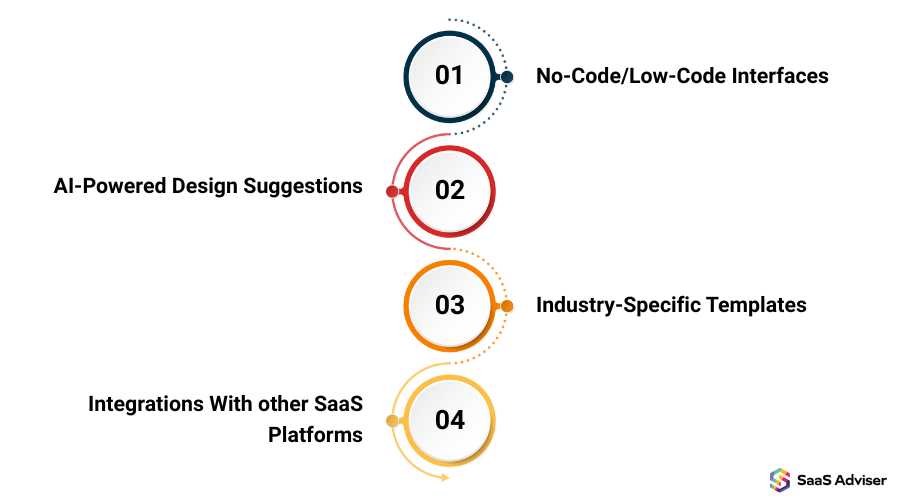
No-Code/Low-Code Interfaces
The emergence of no-code and low-code platforms democratizes the web development. These systems offer user-friendly drag-and-drop interfaces, in order that clients can produce professional websites without coding expertise. This change not only reduces the development time, but also reduces costs, making the site build further available for a wide target audience. The international low-code development platform market is estimated to generate heavy revenues by 2030, which emphasizes its increasing importance in the SaaS landscape.
-
AI-Powered Design Suggestions
AI is becoming crucial to website builder software. AI-driven tools help in designing layouts, producing content, and optimizing for conversions, thereby accelerating the website creation method. Platforms like Wix have integrated AI features to increase person experience and streamline design workflows.
-
Industry-Specific Templates
Website builder programs are increasingly supplying industry-specific templates tailored to sectors such as real estate, healthcare, and restaurants. These niche templates cater to the particular requirements of different industries, supplying applicable functions and compliance standards. This trend, called vertical SaaS, permits businesses to install websites that align intently with their operational requirements and client expectations.
-
Integrations With other SaaS Platforms
Modern website builder software emphasizes seamless integration with various SaaS platforms, collectively with e-mail marketing tools, Customer Relationship Management (CRM) systems, and e-commerce solutions. This interconnected environment allows companies to create a unified tech stack, improving operational performance and client engagement. The capacity to integrate with diverse tools is turning into a standard feature in pinnacle website builders.
4. Who Uses Website Builder Software Free?
-
Small Businesses & Startups
Entrepreneurs and startups use free website builder software to test ideas, create landing pages, and set up an internet presence without heavy investment. These tools permit them to design pro websites, even on tight budgets, through offering drag-and-drop functionality, templates, and SEO tools.
-
Non-Profit Organizations
Nonprofits use website builder programs to communicate their initiatives, accept donations and promote their events. Free plans help them operate within limited budgets while still offering professional layouts, responsive design, and secure hosting.
-
Students & Educational Institutions
Students build portfolios and personal blogs, while educators create class websites using website builder software free tools. These solutions often include basic analytics, easy content publishing, and visual customization ideal for academic use.
-
Freelancers & Independent Professionals
Freelancers like writers, designers, and consultants rely on free website building software to showcase their portfolios and services. These tools help build credibility and attract clients by enabling visually appealing websites without any coding.
-
Hobbyists & Personal Users
Personal users such as bloggers, artists, or enthusiasts often start with free website creation software to share their interests. From travel blogs to resume sites, free website builder programs provide an easy and flexible way to get online.
5. List of Top Website Builder Software
1. Wix
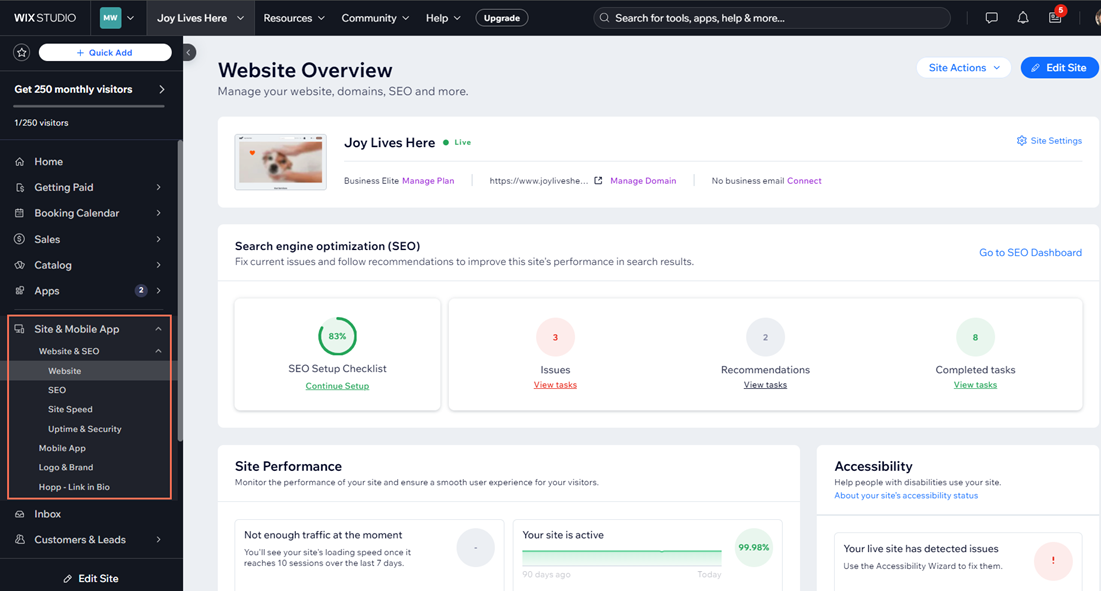
Wix is a website builder program that helps you create website in a few minutes with the help of it’s drag-and-drop functionality and multiple customized templates catering to various industries. The software is a popular choice among hobbyists and small businesses.
Features
-
AI website builder
-
Website templates
-
eCommerce
-
Website analytics
-
Built-in SEO tools
Pros
-
User-friendly interface with no coding required
-
Free hosting and domain
Cons
-
Limited customization options
-
Hidden charges
Pricing: Offers a free plan. Business Elite plan costs $21/month. Business plan costs $10.50/month. Core plan costs $5.83/month. Light plan costs $2.92/month.
2. GoDaddy
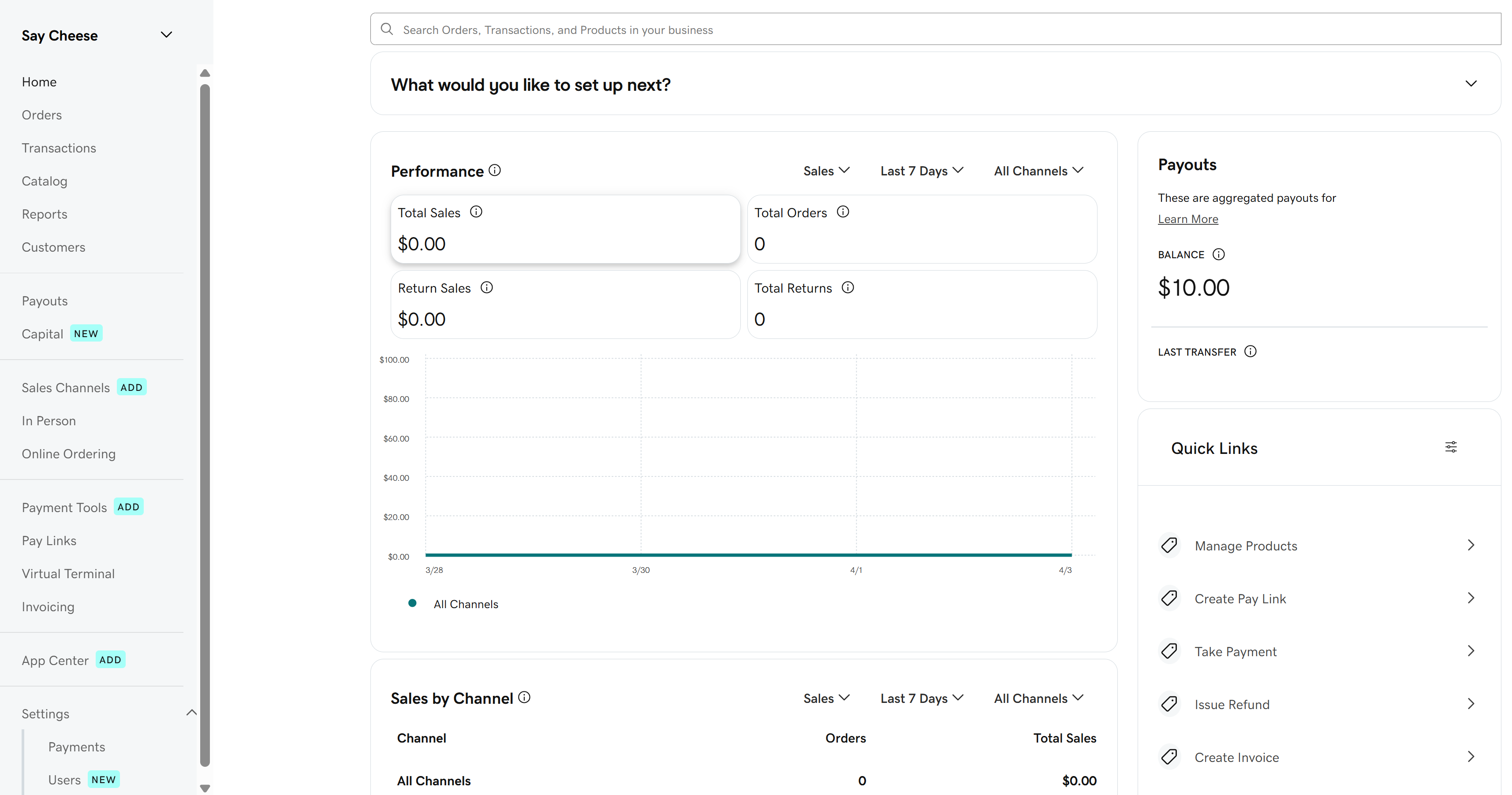
GoDaddy is website builder program that offers marketing tools and built-in hosting with website creation. The program’s main focus is on helping users get their domain for their websites at minimal costs.
Features
-
Domains
-
Websites and Hosting
-
Email integration
-
Security tools
-
Marketing
Pros
-
Free website creation and hosting
-
User-friendly interface
Cons
-
Limited features in basic plans
-
Limited design flexibility
Pricing: Visit website for detailed pricing. Pricing is based on categories and requirements users have.
3. Weebly
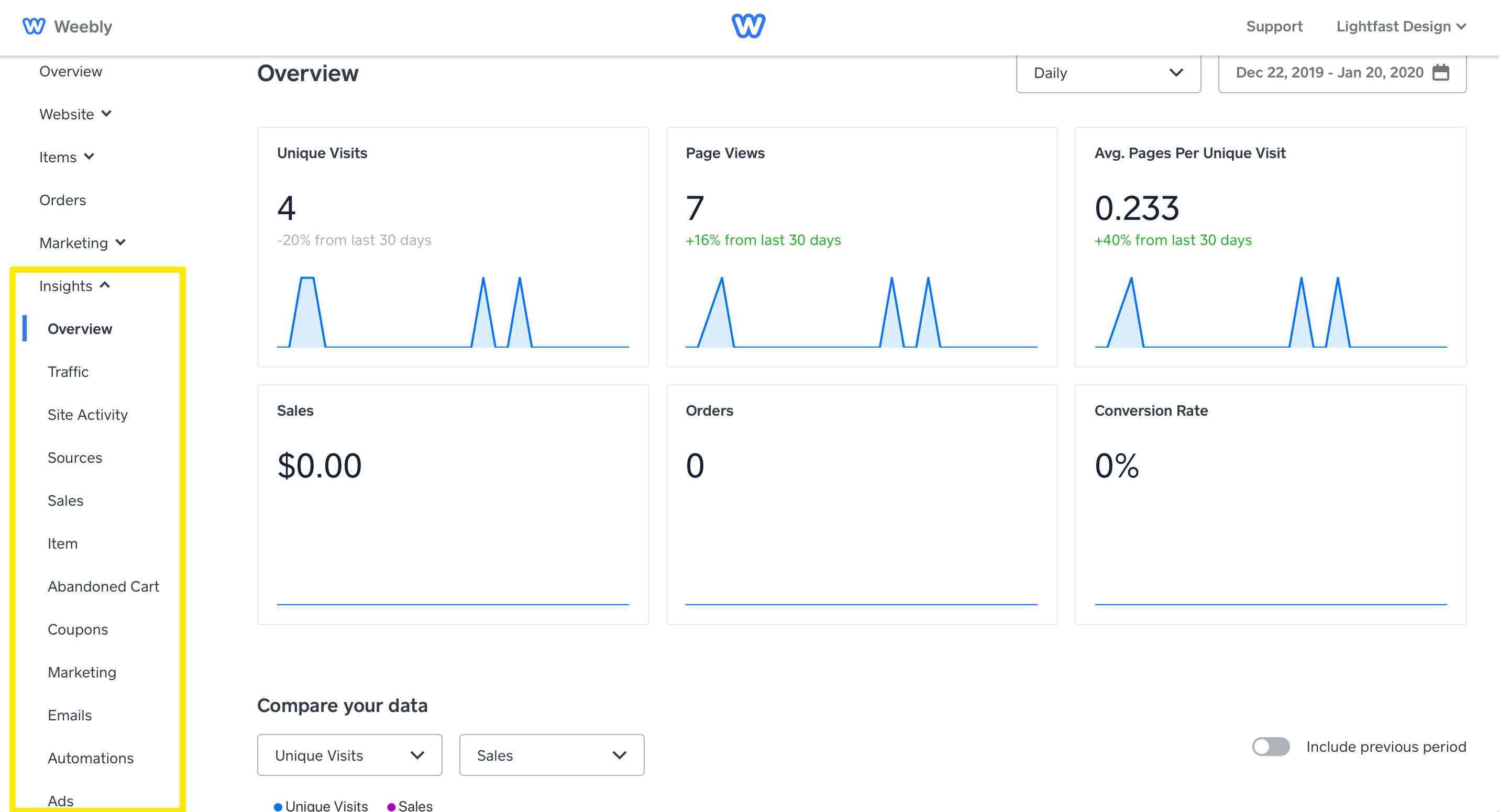
Weebly is a website builder program that helps it’s users to build website for free offering thousands of customized templates for various industries. The program is tailored for users who want to build simple websites and eCommerce stores.
Features
-
Website builder
-
Ecommerce integration
-
Mobile apps
-
Templates
-
App center
Pros
-
User-friendly interface
-
Unlimited data transfers
Cons
-
Lack of Undo feature
-
Limited Customization
Pricing: Offers a free plan. Personal plan costs $10/month for annual use, while $13 for monthly use. Professional plan costs $12/month for annual use, while $16 for monthly use. Performance plan costs $26/month for annual use, while $29 for monthly use.
4. Hostinger
Hostinger is a website builder program that provides website creation and web hosting services to it’s users. The program does not only offer free domain but free website migration as well.

Features
-
Website builder
-
Domains
-
Email integration
-
Ecommer website builder
-
Domain transfer
Pros
-
User-friendly interface
-
Seamless WordPress integration
Cons
-
No phone support
-
Higher renewal prices
Pricing: Visit website for detailed pricing
5. Webflow
Webflow is a website builder program that is basically a SaaS website builder. The program enables web designers to create websites with browser-based visual editing software. Webflow is known for automatically generating HTML, CSS, and JavaScript languages for users without requiring them to code manually.
Features
-
Page building
-
Shared libraries
-
Analyze
-
Optimize
-
CMS
Pros
-
User-friendly Interface
-
Great collaboration features
Cons
-
Limited free templates
-
Complex pricing
Pricing: Visit website for detailed pricing
6. Challenges While Implementing Website Builder Software
-
Limited Mobile Experience Tweaks
While many website builder programs provide basic mobile responsiveness, enforcing superior customizations for mobile-particular layouts, font sizes, or element visibility regularly needs access to premium plans or a some degree of HTML/CSS knowledge. Whether you’re utilizing SaaS website builder or a website builder software for Windows, fine-tuning the mobile display experience can be constrained in free plans and may lack consumer-friendly mobile customization capabilities. This can be a challenge for those seeking pretty responsive design without diving into code.
-
Limited E-Commerce Functionality
Website builder software free or basic versions may lack essential e-commerce features such as advanced cart management, real-time inventory tracking, integrated payment gateways, and CRM integrations. These limitations can hinder small businesses or entrepreneurs looking to scale operations online. Users seeking robust functionality often need to upgrade to premium plans or switch to more comprehensive SaaS website builder platforms that offer full e-commerce toolkits and seamless customer relationship management features.
-
Scalability
As your business expands and your website needs to become more sophisticated, the fundamental functions provided by few website builder software—particularly free or basic versions—might also no longer suffice. You might encounter barriers in scalability, advanced search engine optimization capabilities, e-commerce integration, or customization alternatives. This often leads to the need for platform migration to more robust SaaS website builder solutions or website builder software for Windows that can support higher traffic, complex functionalities, and future growth. Choosing scalable website creation software from the beginning can help minimize disruptions as your business expands.
-
Cross-Browser Compatibility
Some website themes might not render identically throughout all web browsers like Chrome, Firefox, Safari, and Edge, ensuing in inconsistent user experiences. This issue can have an effect on visual layout, font display, and interactive elements—making cross-browser compatibility a essential function to assess in any website builder software.
-
Data Privacy
One of the primary challenges with website builder software, particularly SaaS-based systems, is ensuring sturdy data privacy. These tools regularly store user data inside the cloud, which increases issues regarding data exposure, third-party access, and compliance with worldwide guidelines, consisting of GDPR and CCPA. Users can also find it hard to determine in where their statistics are hosted or whether or not the platform adheres to best practices for encryption, consumer consent, and records retention. Additionally, free or basic plans may also lack advanced privacy controls, making it harder for users to customize cookie banners, privacy policies, or control consumer data rights. This state of affairs can position businesses vulnerable to non-compliance or information breaches.
7. Pros of Website Builder Software
Website builder software has transformed the procedure of creating websites via imparting a price-effective, fast, and consumer-friendly opportunity to traditional web development techniques. Whether you are a beginner utilizing website building software free or a business choosing a SaaS website builder, these structures provide numerous benefits applicable to diverse users and goals.
-
Cost Savings
Website builder software extensively reduces the need for hiring expensive web developers and designers by offering intuitive drag-and-drop tools, customizable templates, and automated design elements. With even the best website building software free options, users can create visually attractive and professional websites on their own, making website creation software an accessible solution for startups, freelancers, and small companies. Whether you’re using a SaaS website builder or a website builder software for Windows, these platforms streamline the design procedure and reduce development costs.
-
Time Efficiency
You can create and publish stunning websites in only some hours with the help of pre-designed templates, drag-and-drop editors, and automated workflows—functions that are commonly found in the best website builder software. Whether you're a small commercial enterprise owner or a freelancer using a SaaS website builder, these tools can take away the need for coding and simplify every step of the design procedure. Even users leveraging website building software free can benefit from efficient solutions to quickly launch a professional online presence.
-
Easy to Use Interface
Modern drag-and-drop tools and intuitive visual editors make the best website builder software an excellent choice for beginners looking to create professional websites without the need for coding. Whether using a website building software free or a SaaS website builder, these features simplify the design process and enable users with no technical skills to achieve impressive results.
-
Customization Options
Website building software gives users the power to personalize their web sites, allowing manipulation over all visual and functional elements. The best website builder software—whether they're SaaS solutions or website builder software for Windows—enable particular customization of color schemes, layouts, typography, and interactive widgets.This frequency of design freedom ensures that each site, even with free versions, matches the exact brand identity and provides an tailored user experience. The best website builder software is initially integrated with ecommerce software, activates product listing, secure payment processing, stock monitoring and mobile-ready checkout, important for online stores in today's digital economy.
-
Rapid Deployment
SaaS website builder tools enable quick and seamless website launches, minimizing delays in development cycles. This makes them perfect for corporations that need to go live fast. These systems offer pre-designed templates, user-friendly drag-and-drop editors, and integrated hosting, easing time and technical complications related to web development. Whether you are a start-up, freelancer or small business, SaaS website builder accelerates deployment, simultaneously ensuring pro quality and mobile responsiveness.
-
Built-in SEO Features
Most website builder software comes with built-in SEO tools that help increase visibility on search engines like Google, Yahoo, and Bing. These tools allow users to edit meta tags, create search engine optimization-pleasant URLs, generate automatic sitemaps, and optimize pics, including alt text. Many modern website builder platforms integrate with marketing automation software, allowing users to create automated workflows for lead generation, follow-ups, and customer segmentation—all from a single dashboard. Whether you're utilizing a SaaS website builder or website builder software for Windows, having those integrated SEO features guarantees that your site can rank higher without relying on third-party plugins. Even website building software free now consists of essential on-page SEO features, making it simpler for small companies and individuals to enhance their online presence.
8. What is Website Builder Software?
Website builder software is a digital platform that allows users to design, build and publish sites without coding knowledge. These tools are mainly designed for individuals, small companies and giant organizations, which permit them to create an expert-grade website with minimum technical knowledge. The best website builder software commonly has capabilities inclusive of Drag-and-Drop capability, custom templates, website optimization software and website hosting services, and offers a comprehensive solution for website creation.
9. Why Do We Need Website Builder Software?
Website builder programs have become essential for corporations and individuals aiming to establish a digital presence. With growing online competition and constrained budgets, users require cheap, fast, and person-friendly tools to create websites. A powerful website builder program helps:
-
Save time with pre-designed templates and simple editing tools
-
Lower costs compared to hiring a web developer
-
Provide easy access to SEO tools and integrations
-
Enable businesses to manage content independently
Many website builder platforms now function similarly to content management software in US, allowing users to edit content, upload media, and manage blog posts without needing separate CMS tools. For many users, a website builder software free version is the starting point for building credibility online.
10. Criteria for Choosing Right Website Builder Software
-
Ease of Use
When using website builder software, whether it's for Windows or a free version, ease of use is crucial. Choose a website builder that simplifies design adjustments, content placement, and navigation layout. This will help make sure that the whole procedure of creating a website is straightforward and pressure-free.
-
Design Flexibility
An exceptional website creation software have to offer users a comprehensive library of customizable templates, a huge variety of fonts, an in-depth color palette, and flexible format alternatives. These features empower users—whether they are using a free plan or a fully featured version—to design websites that reflect their brand identity and meet their audience's expectations. For the ones seeking out website builder software for Windows or a SaaS website builder, this level of flexibility permits the creation of unique, professional websites tailored to personal or commercial enterprise wishes.
-
Responsive Design
With maximum web visitors now originating from smartphones and tablets, your chosen website creation software need to include mobile-optimized themes and responsive design capabilities. Whether you are using a website builder software for Windows or exploring a SaaS website builder, making sure your website looks fantastic and functions easily on all screen sizes is critical. The best website builder software automatically adapts layouts, images, and menus for mobile users, presenting a splendid surfing experience without extra manual modifications.
-
Community And Reviews
When evaluating distinct website builder programs, it’s crucial to check user feedback and online reviews. This can offer a complete know-how of the software's performance, customer service, usability, and reliability, whether it’s a SaaS website builder or a website builder software for Windows. Real user experiences provide treasured insights into how intuitive and reliable the software is. Look for feedback that emphasizes long-term satisfaction, the responsiveness of technical support, consistent features, and ease of use, especially when considering both free and premium website builder options. Check out the communities of the website builder program that would provide you with valuable insights about the software’s usefulness and anytime you require help, people are there to guide you.
-
Maintain a Clear Vision
Identify your website vision—whether it's creating a personal blog, launching an e-commerce store, building a professional portfolio, or publishing a business website online. Choose a website builder that aligns with those precise goals. If your goal is to build high-converting pages for campaigns or product launches, consider website builder programs that offer landing pages software capabilities. These tools make it easier to deploy targeted pages quickly with built-in analytics and A/B testing support. A good website creation software should offer the necessary features and templates without overwhelming you with useless complexity. Whether you select website builder software for Windows or explore a SaaS website builder, ensure the platform supports your content dreams, user engagement plans, and future scalability. Many free versions of website builder software come equipped with tools tailored for specific website types, making it easier for beginners and small businesses to get started effectively.
-
Visual Appeal of Website Themes
High-quality, modern themes are important to create a strong first impression and build user trust. The best website builder software will offer quite a few visually appealing, seasoned layout templates that meet many industries. Whether you use SaaS website builder or the website builder software for Windows, access to industry-specific, responsive themes, complement your website's visual appeal and usefulness. Even if you use a website builder software free, you will ensure that the available themes offer customization options, responsiveness, and a modern aesthetic that match your brand goals.
11. Features of Best Website Builder Software
-
Mobile Responsiveness
Modern website building software guarantees that each site design automatically adapts to smartphones, tabs, and computers, delivering steady standard performance throughout all gadgets. Whether you select a SaaS website builder or website builder software for Windows, mobile optimization remains critical for customer engagement and SEO performance. The best website builder software intelligently resizes layouts, pics, text, and menus to match various screen dimensions without requiring adjustments from users.
-
Social Media Integration
Social sharing buttons, built-in feeds, and login options provide spontaneous connection with social media platforms such as Facebook, Instagram and LinkedIn. The best website builder software enables easy integration of these social media elements, which facilitates an increase in visibility, engagement, and site visitors. Whether you use the website building software or a top-ranked SaaS website builder, social media integration allows users to easily share your content and stay up to date. Many website builder platforms even include scheduling tools and real-time feeds, further enhancing your site's overall marketing capabilities.In addition to social media tools, the best website builder software offers integrations with email marketing software USA, enabling users to automate newsletters, collect email subscribers, and nurture leads directly from their website dashboard.
-
A Variety of Themes
The best website builder software gives hundreds of modern themes tailor-made to precise industries, ensuring that your website aligns with the classy and purposeful expectations of your target audience.Whether you are utilising a SaaS website builder, website builder software for Windows, or a website builder software free, having access to a huge range of themes enhances personalization and brand consistency. These themes are generally designed with responsive layouts, search engine optimization-pleasant structures, and customization options, allowing you to create a professional-looking website with minimal try.
-
Compatible With Different Browsers
It's critical to make sure that the site runs efficiently on Chrome, Firefox, Safari, and Edge for standard access. Cross-browser compatibility is a essential characteristic of any cutting-edge website builder software. Whether you are using a SaaS website builder or website builder software for Windows, constant performance across multiple browsers complements the user experience and reduces bounce rates. The best website builder softwares conducts extensive browser testing to avoid design discrepancies and functional issues.
-
SEO Tools
Built-in SEO optimization capabilities in website builder software are critical for enhancing your website's visibility on search engines. These tools commonly consist of customizable meta tags, real-time keyword management systems, automatic sitemap generation, and options for editing alt text for photos. Whether you’re using SaaS website builder, a website builder software for Windows, or a website building software free, having those native SEO tools gets rid of the want for third-party plugins. The best website builder software additionally gives guidance on on-page SEO practices, assisting users—especially beginners—in optimizing their content efficiently through included recommendations and analytics.
-
Google Analytics Integration
Tracking visitor behavior and website performance with Google Analytics is a tremendous benefit that is integrated into best website builder software. This feature permits users—whether they are the utilizing a SaaS website builder, a website builder software for Windows, or website building software free—to reveal crucial metrics inclusive of page views, bounce rates, session durations, and person demographics. With this statistics, both companies and individuals can make knowledgeable choices to improve user experience and boom conversions. For businesses planning to sell online, the best website builder software often integrates with shopping carts software to streamline product management, checkout processes, and payment gateways.
