What Mid-Sized Companies Actually Pay for DevOps Automation Services: A Financial Breakdown
Mid-sized companies face a pricing trap when shopping for automation tools. They operate too large for startup-friendly free tiers. Yet they lack the negotiating leverage that enterprise clients use to secure volume discounts. This middle ground creates a unique challenge when evaluating the impact and benefits of DevOps-based automation. Yet, these teams still need sophisticated deployment pipelines and monitoring capabilities. However, they must justify every dollar to budget-conscious leadership.
The problem is that standard pricing guides fail for these companies. Vendors design their public rate cards for two audiences: small teams testing products and large organizations ready for custom contracts. A company with 100 developers doesn't fit either category. The published prices rarely reflect what these organizations actually pay. Implementation work adds unexpected costs. Training programs consume more budget than expected. Engineering teams spend weeks making different tools work together. This gap between advertised rates and real spending explains why so many mid-sized teams feel blindsided by their DevOps automation bills.
The Hidden Costs Beyond License Fees
Vendors advertise their platform fees but hide the real expense of DevOps software transformation. The sticker price represents just the starting point. Professional services for initial configuration often cost twice the annual license fee. Companies discover this during contract negotiations when vendors suddenly mention "recommended implementation partners." These consulting firms typically charge $200 to $400 per hour for setup work that takes weeks. The costs keep mounting after launch. Maintenance overhead demands dedicated staff time that most mid-sized teams haven't budgeted for when evaluating DevOps automation tools. Regular updates consume engineering hours because they require testing against existing workflows. The testing burden grows heavier as systems become more interconnected. One change ripples through multiple dependencies. These ongoing expenses frequently exceed what companies pay for the software itself.
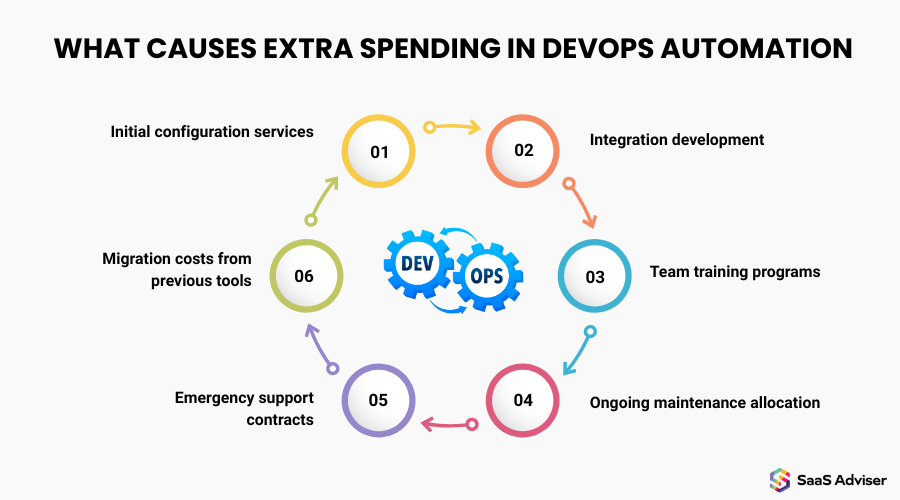
What Mid-Sized Companies Actually Spend Beyond Platform Licenses:
-
Initial configuration services: $40,000 to $120,000 for a deployment pipeline setup that vendors claim takes "just a few clicks."
-
Integration development: $25,000 to $80,000 to connect automation tools with existing infrastructure and legacy systems
-
Team training programs: $15,000 to $45,000 for workshops that teach developers how to actually use the platforms they've purchased
-
Ongoing maintenance allocation: 20-30% of one senior engineer's annual time managing updates and troubleshooting integration failures
-
Emergency support contracts: $12,000 to $50,000 annually for priority access when automated systems fail during critical deployments
-
Migration costs from previous tools: $30,000 to $100,000 to move pipelines and configurations when switching between competing platforms
Container Orchestration Platforms: Real Numbers from 100-Person Development Teams
Container orchestration platforms carry costs that shock mid-sized teams during their first full month of operation. A 100-person development team running managed Kubernetes faces a control plane fee of approximately $72 per month for services like EKS or GKE. That figure covers just the Kubernetes management layer. The real expense emerges in the compute resources beneath it. Infrastructure costs can range dramatically depending on deployment frequency and staging environments.
The managed versus self-hosted decision creates a false economy for most mid-sized companies. Self-hosted Kubernetes requires at least one dedicated DevOps engineer earning an average of $141,000 annually in the US. Running a self-hosted cluster actually demands two to three experienced engineers to handle 24/7 operations properly. When calculated annually, the total cost of ownership for self-hosted Kubernetes approaches $569,000 once you factor in a team of four engineers plus infrastructure expenses. Most of that expense goes to salaries rather than servers.
Monthly Cost Comparison for 100-Person Development Teams
|
Cost Category |
Managed Service (EKS/GKE) |
Self-Hosted Kubernetes |
|
Control plane management |
$72 per cluster |
Included in infrastructure |
|
Infrastructure (compute) |
Varies by workload |
30-50% higher than managed services |
|
Engineering labor (monthly) |
Minimal maintenance |
$23,500 - $35,250 (2-3 engineers at $141,000/year salary) |
|
Upgrade management |
Automated by the provider |
40–60 hours quarterly ($6,000 - $9,000 annually) |
|
Security patching |
Handled by vendor |
20–30 hours monthly ($3,000 - $4,500) |
|
Total monthly cost |
$8,000 - $15,000 |
$14,500 - $22,500 |
CI/CD Pipeline Tools: What Companies Pay at Different Deployment Values
CI/CD automation services follow deceptively simple pricing models that trap mid-sized companies at expensive inflection points. Most teams consume between 30,000 and 50,000 build minutes monthly once they establish a regular deployment cadence. Free tiers vanish quickly. CircleCI offers 6,000 free build minutes before charging $15 monthly. GitLab provides just 400 compute minutes in its free tier. That threshold works for startups testing the waters. Production teams hit it within weeks.
The pricing cliff arrives when deployment frequency increases. CircleCI's enterprise tier jumps to $2,000 monthly. GitLab's premium plan charges $19 per user monthly for 10,000 minutes. A 50-person development team paying per-user fees faces $950 monthly before adding extra compute time. Jenkins appears free as open-source software but demands high hidden costs. Organizations spend 5 to 10 hours weekly on Jenkins maintenance, translating to $15,000 to $30,000 in annual engineering costs. That maintenance burden consumes senior developer time that could be used to build features.
Integration work creates the expense nobody budgets for upfront. Connecting CI/CD platforms to existing version control systems takes days of configuration. Linking deployment automation to cloud providers requires custom scripting. Setting up automated testing frameworks demands weeks of trial runs to catch edge cases. Most platforms advertise plug-and-play simplicity. Reality involves debugging webhook failures and troubleshooting authentication between disparate systems. Teams discover this integration tax only after committing to a specific CI/CD automation service.
Monitoring Solutions: The Expense That Grows Faster Than Your Application
Monitoring solutions present the most deceptive cost structure in DevOps automation services. Basic infrastructure monitoring covers uptime checks and simple metrics. Full-stack observability platforms require separate charges for application performance monitoring. Log management charges per gigabyte of data ingested and retained. Log volumes grow exponentially as monitoring expands across more services. Teams frequently discover that their log costs exceed their compute infrastructure expenses. The budget shock arrives when applications mature into distributed tracing with full observability coverage.
When Monitoring Costs Spiral Beyond Expectations:
-
Initial deployment phase: Basic uptime monitoring costs remain predictable at standard per-host rates
-
Growth phase: Adding distributed tracing and application performance monitoring multiplies baseline costs per host
-
Microservices adoption: Log volume increases dramatically as each service generates its own telemetry streams
-
Debug mode incidents: Temporary verbose logging left enabled in production can spike monthly ingestion costs significantly
-
Compliance requirements: Regulatory needs for extended log retention periods add permanent storage cost increases
-
Custom instrumentation: Business-specific metrics with high cardinality tags create thousands of unique metric combinations that accumulate hourly charges
Six Steps to Calculate Your Actual DevOps Automation Budget
Now, when we understand what can escalate your DevOps spending, let's proceed to the practical part. The typical approach starts with vendor pricing pages. Companies compare listed rates, pick a platform, and expect their budgets to hold. That confidence rarely survives the first invoice. Advertised rates reflect ideal scenarios that don't match real-world implementations. So you need a different calculation method that accounts for the hidden expenses we've covered. Here's how to build a realistic budget before signing contracts.
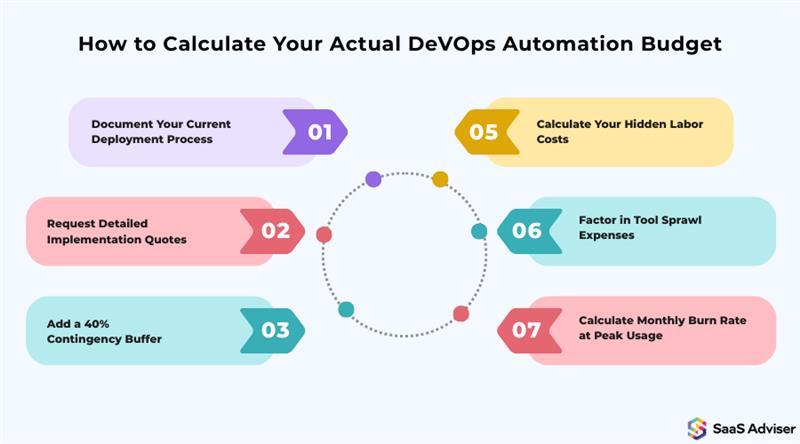
Step 1: Document Your Current Deployment Process
Count how many hours your team spends on deployments each week. Include time spent on manual testing, configuration changes, and rollback procedures. This baseline shows where automation will save time and where it won't.
Step 2: Calculate Your Hidden Labor Costs
Multiply your senior engineers' hourly rates by maintenance time requirements. Add training hours for your entire development team. Most companies discover that labor costs exceed platform licensing by a factor of three.
Step 3: Request Detailed Implementation Quotes
Ask vendors for specific integration costs, not generic estimates. Get written quotes for connecting their tools to your existing infrastructure. Professional services fees often double the first-year total.
Step 4: Factor in Tool Sprawl Expenses
Your CI/CD platform needs monitoring integration. Your monitoring needs log management. Each additional tool adds licensing fees and connection overhead. Budget for the entire ecosystem, not isolated components.
Step 5: Add a 40% Contingency Buffer
Mid-sized implementations consistently exceed initial estimates. Unexpected integration challenges consume budget. Team learning curves take longer than planned. The buffer protects you from scrambling for additional funding mid-project.
Step 6: Calculate Monthly Burn Rate at Peak Usage
Estimate your costs when running at full capacity, not average load. Production incidents spike log ingestion. Launch periods increase build minutes dramatically. Your budget should handle peak months without emergency spending approvals.
ROI Timeline: When DevOps Automation Services Actually Pay for Themselves
The payback timeline for DevOps automation services varies dramatically based on deployment maturity and team structure. Most organizations see measurable returns within 6 to 12 months of implementation. Smaller teams with straightforward deployment pipelines recover their investment faster.
Companies achieving fast returns share common traits. They deploy code multiple times daily through automated pipelines. They calculate direct savings from reduced manual work. A team previously spending forty hours weekly on deployments now spends five hours managing automated systems. That recovered engineering time translates to immediate value.
Organizations waiting years for positive returns face different obstacles. Their automation tools sit underutilized because cultural resistance or technical debt prevents adoption. Teams deploying code weekly see minimal benefit from automation designed for daily releases. Early implementations show lower ROI during experimental phases, but returns compound over time as processes mature. The gap between fast and slow realization comes down to deployment frequency and organizational commitment to eliminating manual workflows.
Mid-sized companies need automation partners who understand their unique budget constraints and technical requirements. ELITEX helps organizations navigate DevOps transformation without the hidden costs that derail implementations. Our team provides transparent pricing and realistic timelines based on your deployment frequency and infrastructure complexity.
Most mid-sized teams spend $2,500–$12,000 per month, depending on tools, cloud usage, and automation depth.
Tooling, cloud infrastructure, security automation, and team expertise are the biggest cost drivers.
Yes. Automation reduces deployment time, downtime, and manual effort, delivering strong long-term cost savings.
Absolutely. Teams often start with CI/CD and infrastructure automation, then expand as budgets and needs grow.