

Marg Overleaf
Marg ERP 9+
 4.5
4.5
 Write Review
Pricing of Marg ERP-Pharmaceutical Industry Software
Pricing plans
Introduce pricing plans
Simple, transparent pricing that grows with you. Try any plan free for 30 days.
- Number of collaborators : 1
- Unlimited private projects
- Real-time collaboration
- Thousands of templates
- Powerful LaTeX editor
- Number of collaborators : 1
- Unlimited private projects
- Real-time collaboration
- Thousands of templates
- Powerful LaTeX editor
Student
USD 15.00 //Month
USD0.00
Perfect for your business requirements and platform usage.
BOOK A DEMO- Number of collaborators : 6
- Includes features of Personal plan
- plus
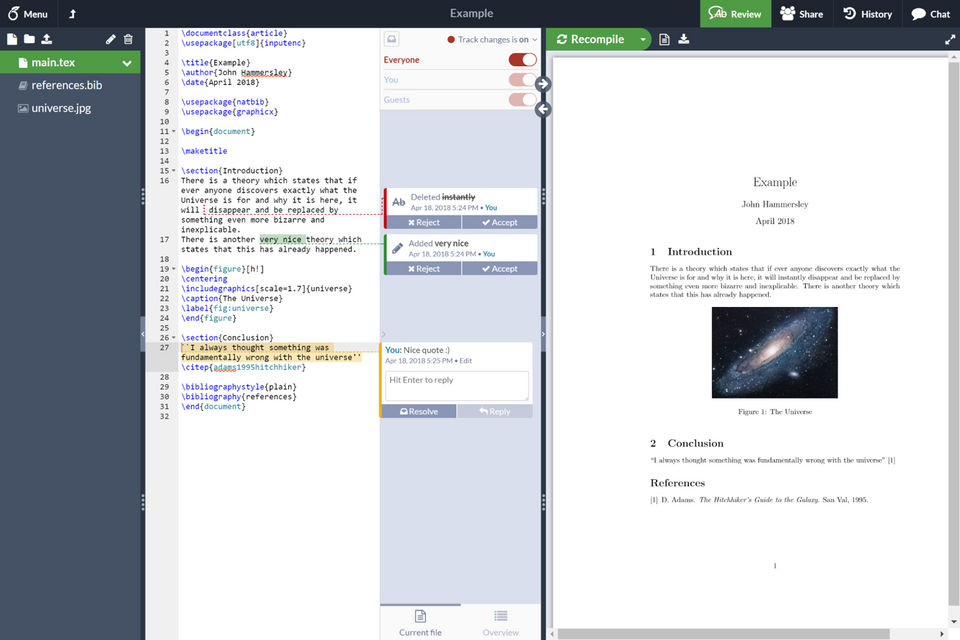
- Real-time track changes
- Advanced reference search
- Reference manager sync
- Full document history
- Dropbox integration
- GitHub integration
- Priority support
- Number of collaborators : 6
- Includes features of Personal plan
- plus
- Real-time track changes
- Advanced reference search
- Reference manager sync
- Full document history
- Dropbox integration
- GitHub integration
- Priority support
Professional
USD 30.00 //Month
USD0.00
Perfect for your business requirements and platform usage.
BOOK A DEMO- Number of collaborators : Unlimited
- Includes features of Collaborator plan
- Number of collaborators : Unlimited
- Includes features of Collaborator plan
Key Specification
| Other Categories: | |
|---|---|
| Deployment: | Cloud Hosted |
| Customer Support: | Online (Ticket) |
| Customization: | No |
| Languages Support: | English |
Who uses Overleaf


Company Details
- Company Name: Overleaf
- Headquarter: london, London United Kingdom
Overleaf Description
Overleaf Video
Alternative
More Alternative



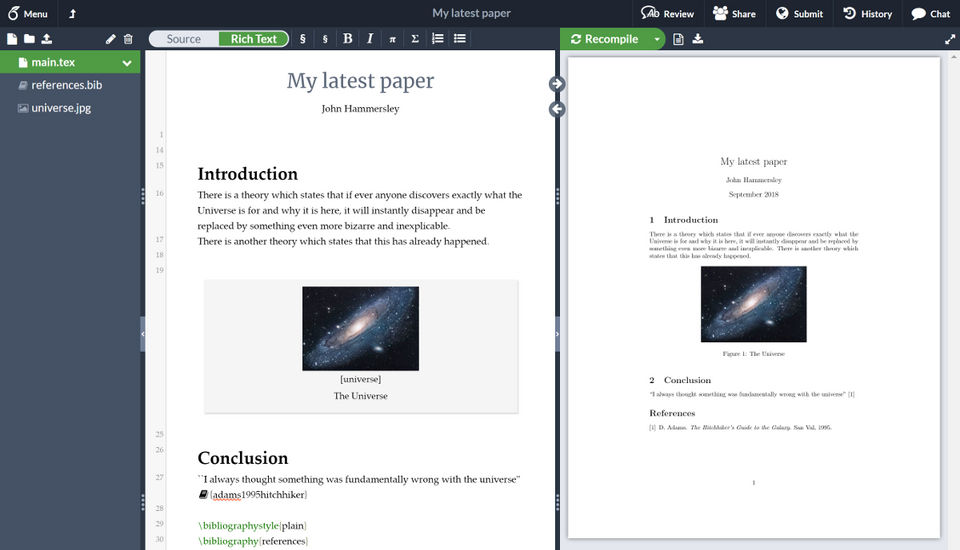
Keka HR Payroll Platform Screenshots
User Reviews
WRITE A REVIEW
non non non non
What do you like best?
The ability to share LaTeX documents and work simultaneously on them is amazing.
What do you dislike?
Local IDE's like texmaker or LaTeXtools for Sublime Text offer the ability to work on documents offline, as well as the possibility to use more packages and shortcuts. This of course comes at a cost, including the learning curve.
Recommendations to others considering the product:
Overleaf is most powerful when synced to Dropbox. However, that price involves a $15/mo. subscription, which may not make it worth it. There are other features available with this subscription, however, so check it out.
What problems are you solving with the product? What benefits have you realized?
Documentation development and journal article writing. Overleaf makes it useful to collaborate over such materials.
What do you like best?
I like how easy it is to make slides for presentations and the easy with which you and coworkers can edit the same file.
What do you dislike?
I think the design of the software is not as nice as some others out there, however, sharelatex is very easy to implement.
What problems are you solving with the product? What benefits have you realized?
I mostly use it to make slides for presentations. They look quite professional when using Latex language.
What do you like best?
Easy to use, great for online collaborative work,
What do you dislike?
Need to have a internet connection, Need to pay to save to Dropbox
Recommendations to others considering the product:
If you need to work collabaratively overleaf is a really good choice. Easy to learn and easy to use. Only limitation is need to go online to work in overleaf.
What problems are you solving with the product? What benefits have you realized?
Document Writing, Nice Output
What do you like best?
It helped me learn and use LaTex. I used LaTex in my PhD study. I was planning to submit a paper to a technical conference. My paper had a lot of tables so LaTex was preferred compared to Microsoft Word. It may take some time to understand how it works but it is much easier than Word afterwards because you manipulate objects by code and the software will take care of the other things for you.
Using code also means you can use Q&A websites to solve your problem.
What do you dislike?
The problem I had with Overleaf is that compiling a document is slow. To solve this problem I installed a local Latex editor on my desktop. Then, I committed the changes to Overleaf using Github desktop.
What problems are you solving with the product? What benefits have you realized?
Overleaf made it easy for me to compile LaTex documents and also to communicate with other team members. In my case, it was my co-supervisor.
Keka HR Payroll Platform Key Clients
Frequently asked questions
Everything you need to know about discovering, comparing, and choosing the right AI software for your business.
Overleaf has 3 plans,
- Personal USD 0.00
- Student USD 15.00 /Month
- Professional USD 30.00 /Month
Overleaf provides Online (Ticket) support.
Overleaf is allowed 0 Days Free Trial.
Overleaf provides Help Guides,Blogs,Video Guides for the software training.
Need Help Selecting
the Right AI Solution?
Speak with our team for tailored recommendations and insights to accelerate your AI adoption.
