
Marg Nimbus Note
Marg ERP 9+
 4.7
4.7
 Write Review
Pricing of Marg ERP-Pharmaceutical Industry Software
Pricing plans
Introduce pricing plans
Simple, transparent pricing that grows with you. Try any plan free for 30 days.
- 1-2 members
- 50 Notes Limit (per workspace)
- 10 Mb Max attachment size
- 100 Mb Monthly upload limit
- 2 Team members (including owner)
- 1 Workspace
- Offline access
- 1-2 members
- 50 Notes Limit (per workspace)
- 10 Mb Max attachment size
- 100 Mb Monthly upload limit
- 2 Team members (including owner)
- 1 Workspace
- Offline access
Pro
USD 3.99 //Month
USD3.99 /Month
Perfect for your business requirements and platform usage.
BOOK A DEMO- 1-3 members
- Unlimited Notes limit
- 1 Gb Max attachment size
- 5 Gb Monthly upload limit
- 3 Team members (including owner)
- 3 Workspaces
- Offline access
- Priority support
- Nimbus Capture Pro
- Search text in images (OCR)
- Document scanner (OCR)
- Search text in documents
- 1-3 members
- Unlimited Notes limit
- 1 Gb Max attachment size
- 5 Gb Monthly upload limit
- 3 Team members (including owner)
- 3 Workspaces
- Offline access
- Priority support
- Nimbus Capture Pro
- Search text in images (OCR)
- Document scanner (OCR)
- Search te
Teams
USD 6.00 //User/Month
USD5.00 /User/Month
Perfect for your business requirements and platform usage.
BOOK A DEMO- 2 members
- Unlimited Notes limit
- 1 Gb Max attachment size
- 14 Gb Monthly upload limit
- For above 30 Team members (including owner)
- 5 Per member Workspaces
- Offline access
- Priority support
- Nimbus Capture Pro
- Search text in images (OCR)
- Document scanner (OCR)
- Search text in documents
- Admin controls and capabilities
- Organization-level permissions
- Custom domain (CNAME)
- Client portal (Guest accounts)
- JS/HTML injections (for integrations)
- Your Logo and Branding
- 2 members
- Unlimited Notes limit
- 1 Gb Max att
- 35+ members
- Unlimited Notes limit
- 1 Gb Max attachment size
- Custom Monthly upload limit
- Custom Team members
- Custom Workspaces
- Offline access
- Priority support
- Nimbus Capture Pro
- Search text in images (OCR)
- Document scanner (OCR)
- Search text in documents
- Admin controls and capabilities
- Organization-level permissions
- Custom domain (CNAME)
- Client portal (Guest accounts)
- JS/HTML injections (for integrations)
- Your Logo and Branding
- 35+ members
- Unlimited Notes limit
- 1 Gb Max attachment size
- Custom Month
Key Specification
| Other Categories: | |
|---|---|
| Deployment: | Cloud Hosted |
| Customer Support: | Business Hours,Online (Ticket) |
| Customization: | No |
| Languages Support: | English |
Who uses Nimbus Note


Company Details
- Company Name: Nimbus Note
- Headquarter: Cleveland,
Nimbus Note Description
Key Features & Specifications
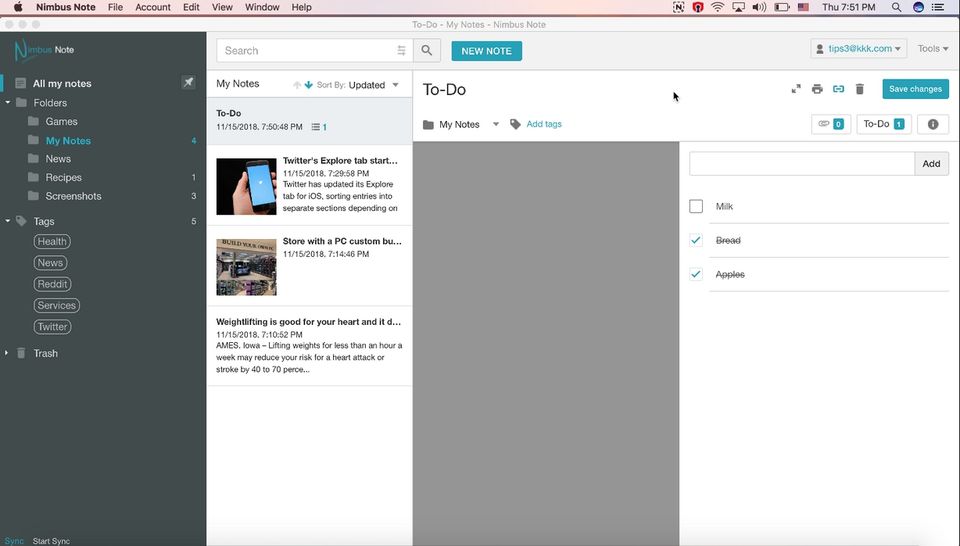
- Recurring Tasks
- To-do List
- Calendar Notification
- File Sharing
- Real-time Collaboration
- Task Tracking
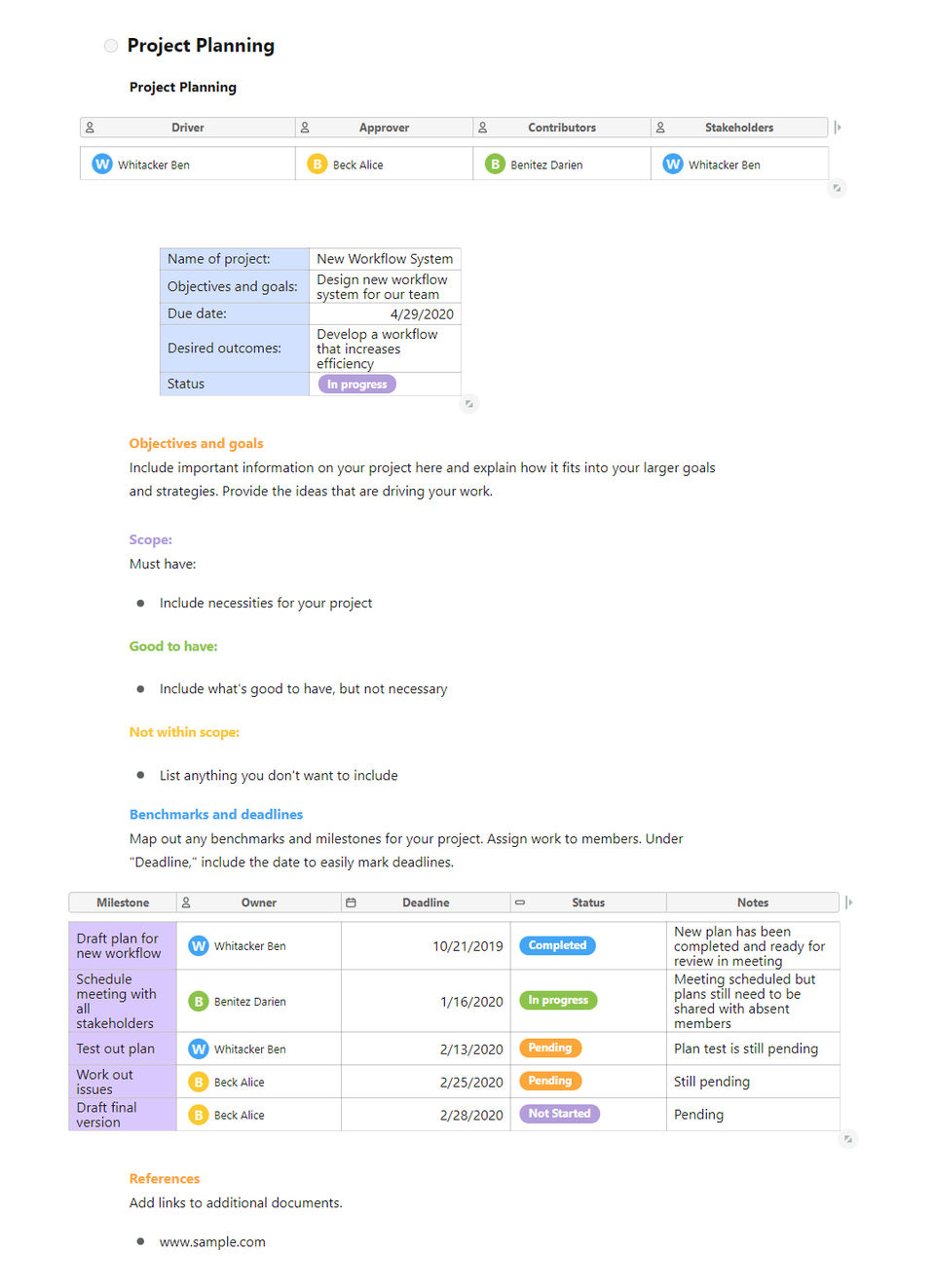
- Templates
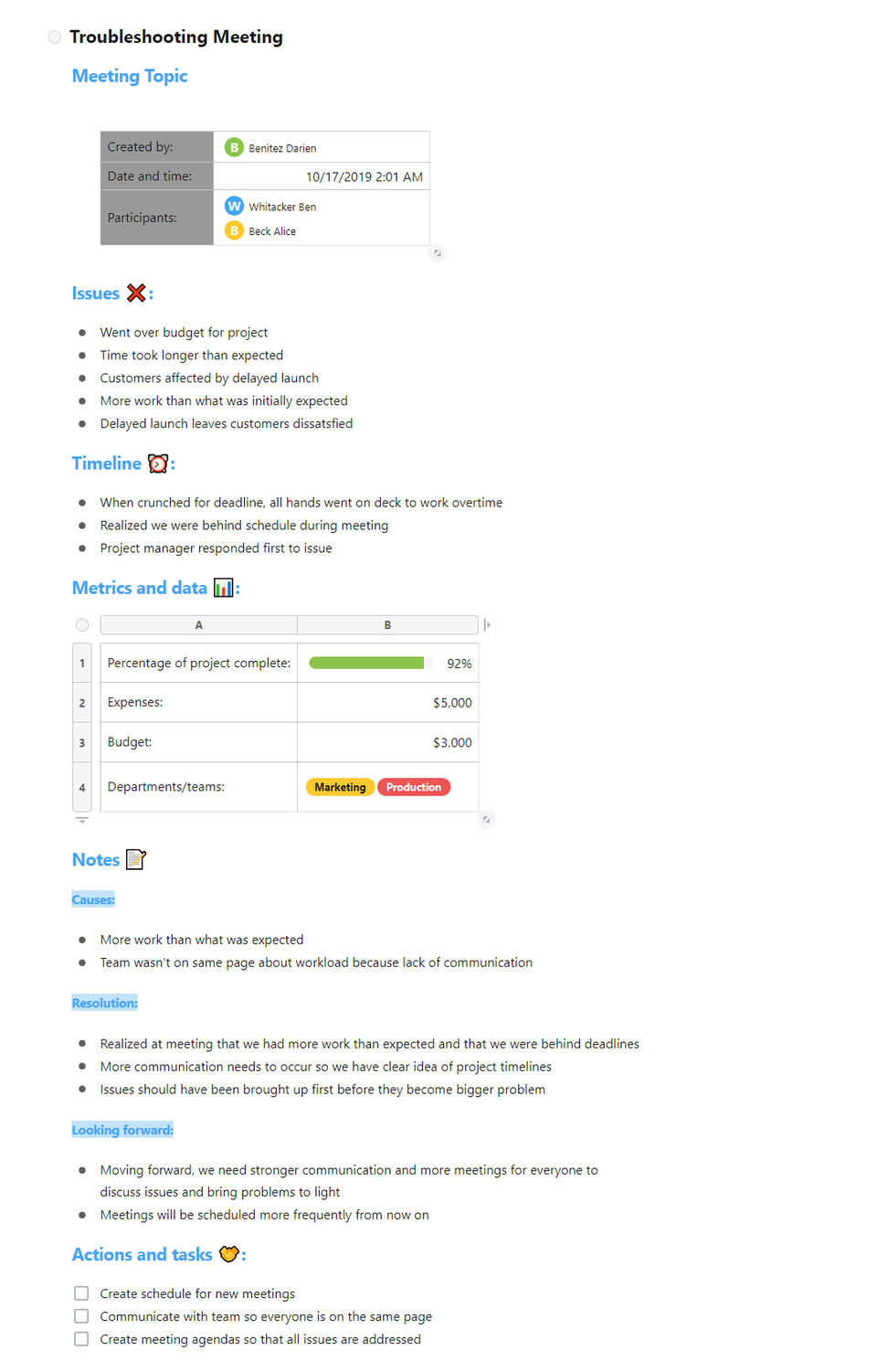
- Meetings
- Version Control
- Share Link
Nimbus Note Video
Alternative
More Alternative
Google Workspace

The better way to work

Meetgeek
Maximize the value of your meetings & customer calls & hiring interviews

Fathom AI Notetaker
Never take notes again #1 rated AI Notetaker
Keka HR Payroll Platform Screenshots
User Reviews
WRITE A REVIEW
What do you like best?
I like Nimbus mostly because it provides many ways to save up a note including images, to do list, any many more. It really saves time and keeps me updated. The features of Nimbus are really cool and helpful to save any kind of note.
What do you dislike?
The least helpful about Nimbus is that sometime it's freezes, but rest of the features are quite great and works completely well.
Recommendations to others considering the product:
Yes, definitely go for it. It has many features including to-do task, etc which is way far better than any other note taking software.
What problems are you solving with the product? What benefits have you realized?
With Nimbus I mostly save my day to day schedule, important dates, appointments and other office work, which is very helpful for me all the time.
What do you like best?
I like the complete package Nimbus Note offers. It helps you as a note taking app, it helps you manage customer, it helps you even if you are a teacher. That is something super cool.
I personally use it for taking notes. I write a lot. Whatever I think I write. Earlier I used to use Google Keep but this tool is much more powerful, and I am able to organize all my information better.
This allows me to write without worrying.
Also I am using it for my non profit. This allows me to set up task, follow up on their progress and much.
Added feature like recording like loom and annotation is cool. I can easily leave multiple software and tool behind use it for my purpose.
What do you dislike?
I wish the app could be more powerful, and they still don't have the handwriting feature for note taking on ipad app.
I think it is in their road. I hope they bring it soon.
Recommendations to others considering the product:
You can switch to nimbus. You will like it. Also it is not tough to make a switch.
What problems are you solving with the product? What benefits have you realized?
I am able to swtich from multiple apps. I use to use google keep because of its accessiblity. but I am switching slowly and compeletely to Nimbus.
This helps me be clutter free and organized.
What do you like best?
Easy of use, that is a cloud based tool and allows to control all your team.
What do you dislike?
I will like to have an MAC App that allows me to capture screenshots, record video etc, and not to need to be done with the chrome extension.
What problems are you solving with the product? What benefits have you realized?
Collecting ideas, creating work flows and sharing documents with my team.
What do you like best?
I use all the chrome extension to pick and collect notes around the web, it's super easy and slick, plus once you are in your workplaces the solution to display, organize content and share it's super nice
Embed is great too and you can use on sites easily with a few link of HTML code
What do you dislike?
Nothing, sometimes it's a bit slow but really has happened once or twice
The admin business dashboard is not "integrated" and jump to another different UI designed site that seems different
Recommendations to others considering the product:
Try and test, you will buy and maybe move from Evernote!
What problems are you solving with the product? What benefits have you realized?
Taking note super-fast
sending screenshots and video recording
Finally organizing my messy notes!
What do you like best?
I am a small business owner who has been using many different platforms to stay organized, whether its paper work or client management.
It is a great tool if you have trouble staying on top of your organization while communicating your team and clients. Nimbus has been really helping me for the past 4 months I have been using it.
There are four things that really stand out to me with Nimbus:
- Custom Branding: Nimbus lets you have custom branding for each organization on your account, as if white-labeling and this makes my clients more welcome to using the product. This helps me communicate better with them and the projects are seeming to flow much better.
- JS/HTML injection: Being a programmer who knows JS and HTML, I love that I can inject a bit of code and make the notes customized to how I want it.
- Dark Theme: Nimbus allows you to use Dark Theme if you want, I personally enjoy it when I am working in the evenings!
- Mention feature: When creating a note, you can link notes to each other or other people. So you can always cross-reference if needed, while making team members aware of things.
What do you dislike?
I haven't ran into any trouble with Nimbus at the moment, if in the future I come across something that bothers me I will update.
Recommendations to others considering the product:
Try the trial period (its free), and start off with one of their pre-made templates. After a day or two of playing with it, you'll see if Nimbus fits your use case.
What problems are you solving with the product? What benefits have you realized?
I am using Nimbus for project development, client communication, and accounting.
For Project Development - The mention feature, along with tagging helps my team communicate. I love how its simply just notes, but you can really pour all your ideas into it. It's great as if we ever need to go back, we can always refer to our notes and see why we made the choices...
For Client Communication - The custom branding is great, makes my customers feel valued. Also makes them more likely to use Nimbus, better than using Google Sheets to manage ideas or emailing each other (as they always get lost!)
For Accounting - You can also embed PDF documents, so I usually make a note and add the Invoices for each customer there as PDF. I feel much safer using Nimbus (its on the cloud) rather than storing the invoices on my own laptop incase something happens to it.
Keka HR Payroll Platform Key Clients
Frequently asked questions
Everything you need to know about discovering, comparing, and choosing the right AI software for your business.
Nimbus Note has 4 plans,
- Starter USD 0.00
- Pro USD 3.99 /Month
- Teams USD 6.00 /User/Month
- Teams+ USD 0.00
Nimbus Note is the AI Note Taking Software used for the below functionalities.
Top 5 Nimbus Note features
- Recurring Tasks
- To-do List
- Calendar Notification
- File Sharing
- Real-time Collaboration
Nimbus Note provides Business Hours,Online (Ticket) support.
Nimbus Note is not allowing Free Trial.
Nimbus Note provides Help Guides,Blogs,Video Guides for the software training.
Need Help Selecting
the Right AI Solution?
Speak with our team for tailored recommendations and insights to accelerate your AI adoption.
