
Marg Kaseya BMS
Marg ERP 9+
 5.0
5.0
 Write Review
What is Kaseya BMS?
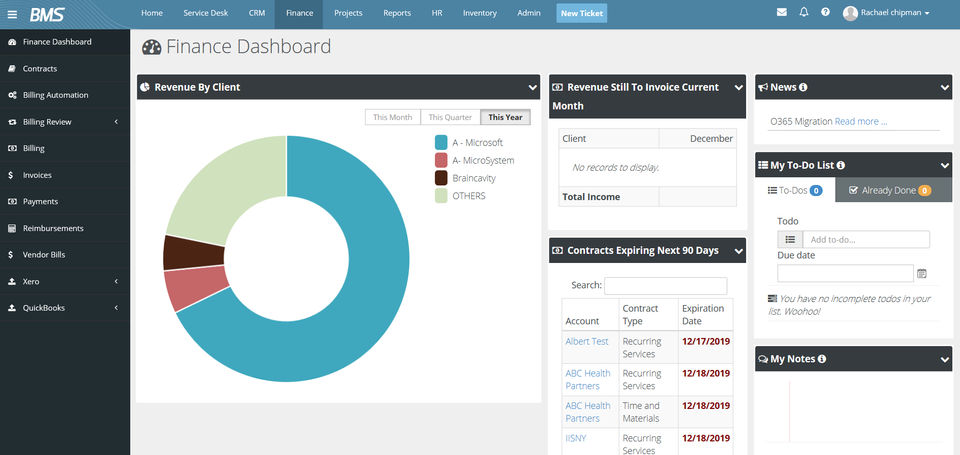
Kaseya BMS (Business Management Solution) is a comprehensive platform designed for managed service providers (MSPs) to manage billing, service desk operations, contracts, and financial workflows. It centralizes core business functions and supports scalability through automation and seamless data flow. Many Kaseya BMS reviews highlight its ability to unify operations within a single system.
Pricing of Marg ERP-Pharmaceutical Industry Software
Pricing plans
Introduce pricing plans
Simple, transparent pricing that grows with you. Try any plan free for 30 days.
Kaseya BMS
USD 0.00 /
USD0.00
Perfect for your business requirements and platform usage.
BOOK A DEMO- Real-Time Dashboard
- Workflow rules
- Asset Information
- Remote Access to Devices
- Auto-remediation of Tickets
- Centralized View Into Customer Assets
- Financial Summary
- Project Template
- Expense tracking
- Project Billing
- Account Management
- Quotations
- Sales Cycle
- Time Tracking
- Management of Invoices
- Real-Time Dashboard
- Workflow rules
- Asset Information
- Remote Access to Devices
- Auto-remediation of Tickets
- Centralized View Into Customer Assets
- Financial Summary
- Project Template
- Expense tracking
- Project Billi
Key Specification
| Other Categories: | |
|---|---|
| Deployment: | Cloud Hosted |
| Customer Support: | Online (Ticket),Business Hours |
| Customization: | No |
| Languages Support: | English |
Who uses Kaseya BMS


Company Details
- Company Name: Kaseya BMS
- Headquarter: New York,
Kaseya BMS Description
Why Choose Kaseya BMS?
Organizations choose Kaseya BMS for its deep alignment with MSP business models and robust automation capabilities. The platform integrates service management with billing and reporting, reducing manual effort and errors. Secure access via Kaseya BMS login and extensive support resources make it a reliable solution for growing MSPs.
Benefits of Kaseya BMS
- Streamlined billing and invoicing processes
- Improved service desk and ticket management
- Centralized contract and financial management
- Enhanced operational visibility and reporting
- Scalable solution tailored for MSPs
These benefits enable service providers to improve efficiency and profitability.
How to Use Kaseya BMS
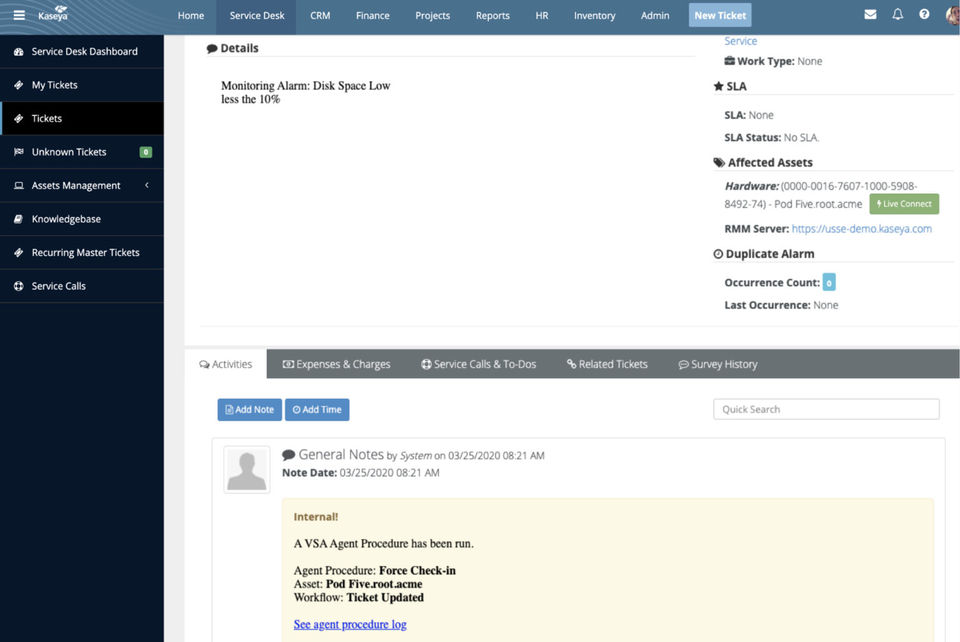
To get started, users sign in through Kaseya BMS login and configure business settings such as billing rules, contracts, and service workflows. Teams can then manage tickets, track time, and automate invoicing. Reference materials from Kaseya BMS documentation help users customize and optimize the platform.
Features of Kaseya BMS
- Automated billing and invoicing
- Service desk and ticket management
- Contract and subscription management
- Financial reporting and analytics
- Kaseya BMS integrations with other Kaseya tools and third-party platforms
- Access via web and Kaseya BMS mobile app
These features support end-to-end business management for MSPs.
Kaseya BMS Demo
Kaseya BMS offers a guided demo that showcases its billing, service desk, and reporting capabilities. The demo allows MSPs to evaluate how the platform aligns with their operational and financial requirements.
Kaseya BMS Pricing
Kaseya BMS pricing varies based on the number of users, features, and service requirements. Factors such as Kaseya pricing per agent may influence overall costs. For accurate and customized pricing details, it is recommended to contact Saas Adviser for pricing, who can provide expert guidance based on your business needs.
Key Features & Specifications
- List Management
- Customer Support
- Marketing Automation
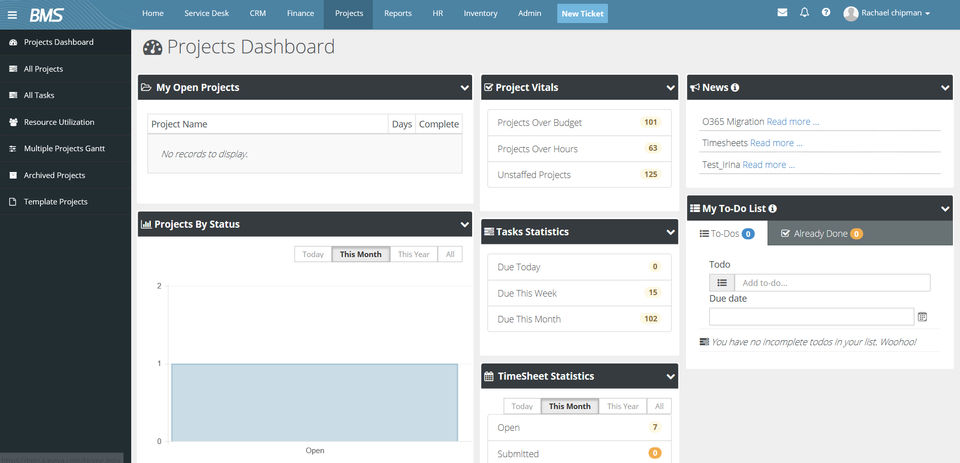
- Project Management
- Lead Scoring
- Call Logging
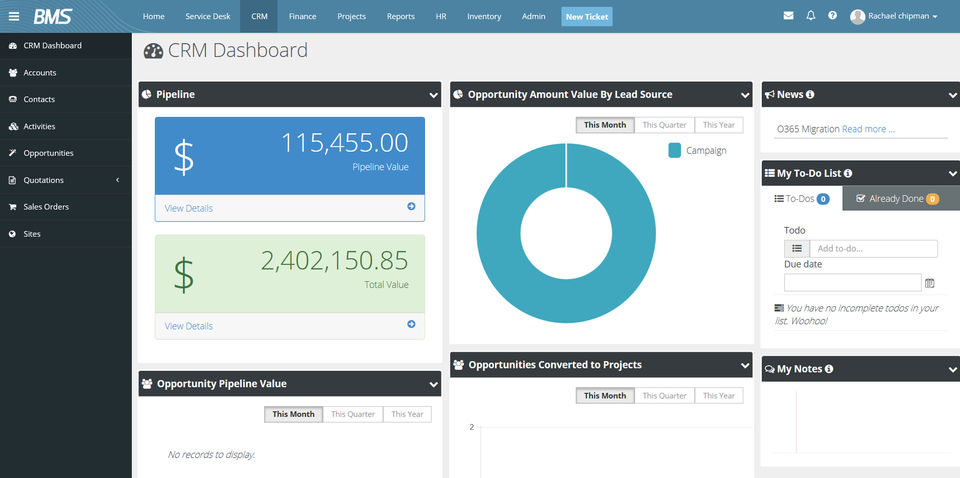
- Contact Management
- Quotes (Proposals)
- Referral Tracking
- Product Catalog
Kaseya BMS Video
Alternative
More Alternative



Keka HR Payroll Platform Screenshots
User Reviews
WRITE A REVIEW
What do you like best?
It gives the status of all our customers accounts. Allows tracking of inventory very well.
What do you dislike?
Nothing, the product works as it should.
What problems are you solving with the product? What benefits have you realized?
Reducing cost and increasing productivity.
What do you like best?
We have been able to easily defer the levels of services contracted by our clients and thus adapted our way of managing priorities.
The integrated management of the workflows allowed us to model the escalations as well as the customer alerts.
The connection with Kaseya VSA allows us to recover the alerts resulting from the system monitoring and the list of assets associated with the clients. This allows a very fine analysis of the processing performed in ServiceDesk.
What do you dislike?
The limit is the customization. you can easely add custom field but not custom forms
Recommendations to others considering the product:
there a lot of Tools you can use with BMS from other vendors. Very powerfull with BrightGauge for example.
What problems are you solving with the product? What benefits have you realized?
We have integrated the BrightGauge and customerthermometer tools very easily and benefited from an operational dashboard within minutes and simplified satisfactions surveys.
The results were felt in less than three months with improved internal performance, and traceability of interventions exploitable in BI.
What do you like best?
BMS has simplified our business processes as a fully functional PSA which integrates with our entire tool set. As a start up the benefits are incredible. An all in one solution for service management, sales tracking, financial management, and human resources.
The layout is refreshingly easy to use and understand. Customization and configuration is simple. The Professional services team from Kaseya really helps you to understand the ins and outs of the software. Enabling you to easily make adjustments at any time without any advanced programming or support.
Kaseya BMS is a breath of fresh air for an MSP like us. Finally a product that truly understands what we do. BMS provides us more time to focus on taking care of our clientele, building our brand and training our staff. Spending less time on our PSA has been key when we had to move fast when it comes to jump-starting our client base.
What do you dislike?
Not much to dislike. However, there is always room for improved customization on invoices, forms, etc.
Recommendations to others considering the product:
I would highly recommend considering BMS f you are looking for a single pane of glass for managing your clients, staff, expenses, and receivables that is affordable and easy to use.
What problems are you solving with the product? What benefits have you realized?
BMS saves us time and money when it comes to our workflows and processes. Integration is simple with Kaseya VSA, Ticketing, Customer Surveys and IT Glue.
The built in CRM really helps an IT focused professional like myself keep track of customer relationshps and sales without losing focus on the work I do.
What do you like best?
Love everything about it. Very easy to use
What do you dislike?
The reporting can use some work. I hear they are fixing that though.
What problems are you solving with the product? What benefits have you realized?
Better ticket management.
What do you like best?
Remote monitoring, ticketing, ticket tracking, user support, assets management
What do you dislike?
I couldn't find any issue. All features and others are working fine with me.
What problems are you solving with the product? What benefits have you realized?
Remote Support, Remote Monitoring
Keka HR Payroll Platform Key Clients
Frequently asked questions
Everything you need to know about discovering, comparing, and choosing the right AI software for your business.
Kaseya BMS has 1 plans,
- Kaseya BMS USD 0.00
Kaseya BMS is the AI CRM Software used for the below functionalities.
Top 5 Kaseya BMS features
- List Management
- Customer Support
- Marketing Automation
- Project Management
- Lead Scoring
Kaseya BMS provides Online (Ticket),Business Hours support.
Kaseya BMS is not allowing Free Trial.
Kaseya BMS provides Help Guides,Video Guides,Blogs for the software training.
Need Help Selecting
the Right AI Solution?
Speak with our team for tailored recommendations and insights to accelerate your AI adoption.
