
What we'll cover
Share with your community!


Get Free Consultation


QuickBooks vs Xero: Best AI Accounting Tool for Businesses?
 David N. Wilks
Choosing the right AI accounting tool starts with these two platforms for most businesses. QuickBooks holds roughly 62% of the small business accounting market. Xero holds about 18% and has been growing steadily, particularly outside the US. Between them, these two platforms cover the accounting needs of the vast majority of small and mid-size businesses globally. Each has made a different bet on what the ideal ai accounting tool should prioritize, and the debate between them is one of the more useful ones in the space because of that real difference.

Looking for AI Accounting Software? Check out Software Adviser’s List of the Best AI Accounting Software in USA for your business.
Choosing the right ai accounting tool comes down to where your business operates, how many people need access, and how much of your accounting is tied to payroll and tax compliance.
What Are QuickBooks & Xero? (Quick Overview)
What Is QuickBooks?
QuickBooks Online has been around since 1992. It has been a market share leader since Intuit launched it and is still the dominant platform by a wide margin today. Most US accountants and CPAs work in it daily, and the export compatibility with ProConnect, Lacerte, and other professional tax platforms reflects that reality rather than creating it. As an AI accounting tool, QuickBooks in 2026 deploys AI agents that take over the repetitive transaction work. Expense categorization learns from the specific business over months rather than running off generic rules. Sales tax calculates automatically across jurisdictions. Anomalies surface in the data before anyone goes looking for them. After a few months of normal use, auto-categorization accuracy sits between 85 and 90 percent for most businesses.
What Is Xero?
Xero started in New Zealand in 2006. Sixteen years later, 4.4 million subscribers across 180+ countries. That international reach isn't a recent expansion strategy. The platform was built for it from day one, not retrofitted afterward. One thing that catches almost everyone off guard when comparing the two: Xero includes unlimited users on every pricing tier. Every single one. As an ai accounting tool, Xero introduced JAX (Just Ask Xero) in 2026. Ask it a question the way you'd ask a colleague, and it responds with the answer rather than pointing to a menu. "Show me overdue invoices from this quarter" comes back immediately, no navigation required. JAX also handles routine financial email drafts and generates report summaries from account data without anyone building the report from scratch.
QuickBooks vs Xero: Quick Comparison Table
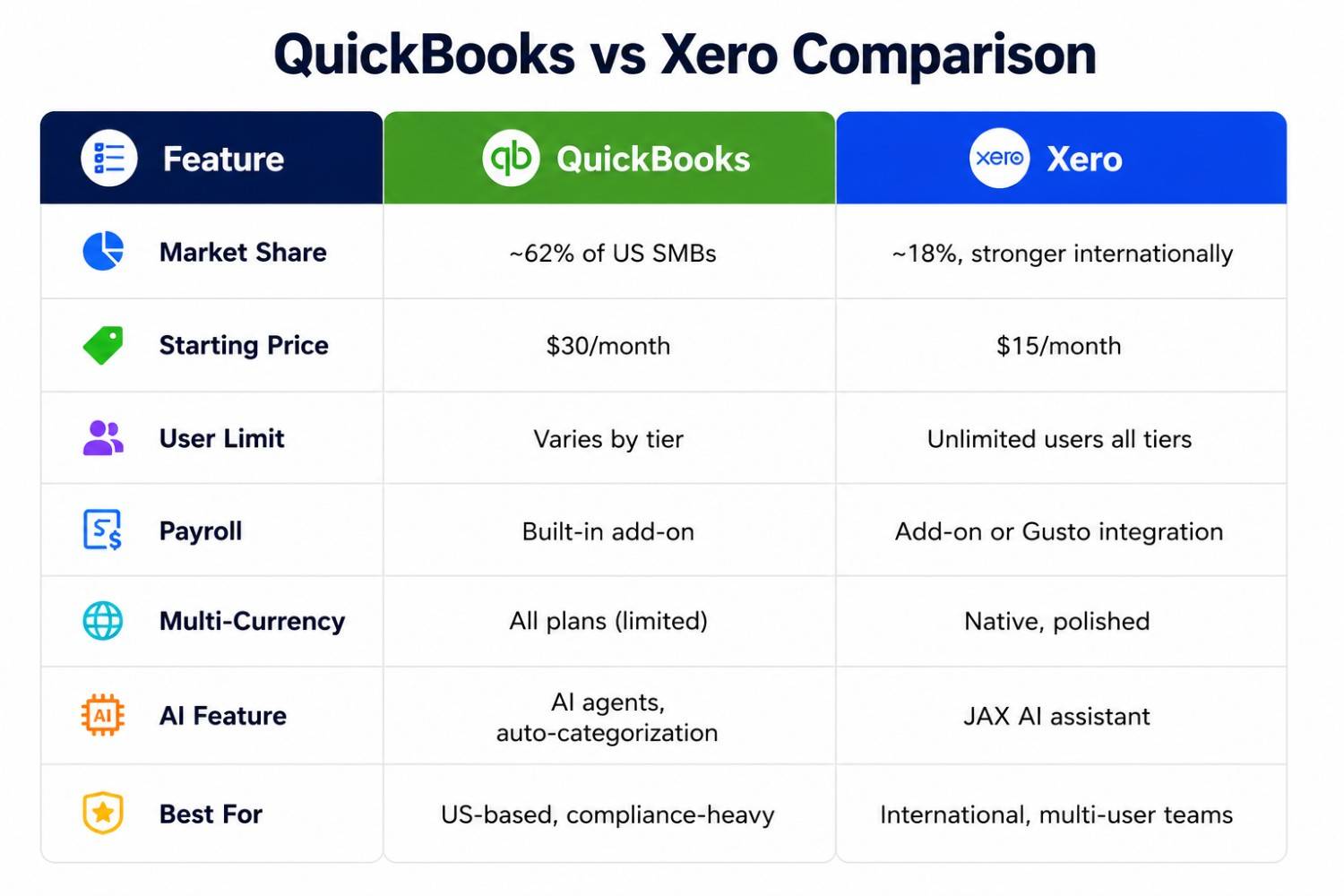
Feature-by-Feature Comparison
Invoicing & Billing
QuickBooks gives more control over invoicing. Industry-specific templates, batch invoicing on advanced custom payment terms, and options for businesses whose billing and invoicing software needs don't fit a standard template. Xero's invoicing prioritizes the common scenario over every possible edge case. Cleaner interface, automated payment reminders that send themselves without anyone scheduling them, recurring billing built around subscription models rather than one-off projects. It doesn't try to cover every invoice edge case. It covers the typical ones well and does it more intuitively than QuickBooks does for most users. Both handle the core invoicing job well. Where they differ is in how much complexity they expect the user to manage.
Expense Tracking & Management
QuickBooks supports both manual and rule-based transaction categorization. Bank rules handle recurring patterns automatically, and the machine learning improves accuracy over time. Xero automates much of the transaction workflow natively, importing bank feeds in real time and using machine learning to suggest categorizations without manual rule-writing. Both get the job done well, but Xero's approach requires less initial setup for businesses without complex categorization requirements.
Payroll Processing
QuickBooks integrates payroll as a native add-on, which handles US payroll , tax filings, and direct deposit within the same interface. No third-party integration required. Xero's payroll software runs through integrations in the US, typically through Gusto, which adds a separate subscription cost and a separate system. For US-based teams, this is a material advantage for QuickBooks. The sticker price gap between the two platforms often closes once Gusto is factored into Xero's total cost.
Tax Management & Compliance
This is where QuickBooks' market dominance shows its value. Most US accountants work in QuickBooks daily, and the export compatibility with professional tax software means handing books to a CPA requires minimal manual work. AI-powered sales tax management catches calculation errors and flags issues before filing. Xero's tax management integrates well into its accounts production software for international markets, but in the US, accountant preference often decides this category.
Bank Reconciliation
QuickBooks connects to over 14,000 financial institutions and uses bank rules and machine learning for auto-categorization. Xero connects to roughly 12,000 institutions globally. Xero's "Find & Match" workflow handles the common scenario, one deposit matching multiple transactions, more cleanly than QuickBooks does. The 2026 update layered on "Reconcile Suggestions": potential duplicates get flagged before they make it into the books rather than becoming errors to untangle after the fact.
Third-Party Integrations
QuickBooks has the larger ecosystem in the US, connecting to most major tools that US small businesses use. Xero's app marketplace sits at 1,000+ integrations. The connections that stand out most are in e-commerce, inventory management, and international banking. That profile reflects who the platform was built for. Missing a native integration rarely stops a team for long on either platform. Both are extensible enough that gaps close with one additional app.
AI Capabilities Compared
QuickBooks AI Features
Intuit's AI agents built into QuickBooks Online take the repetitive work off the table. Categorization is the most visible: machine learning trained on the specific business reaches 85-90% accuracy after a few months without anyone tuning it manually. Sales tax is another: calculations across different jurisdictions happen automatically, and errors get flagged before filing rather than after. The anomaly detection is subtler but worth noting. Unusual transactions surface before a human spots them in a manual review, which is when catching them matters.
Xero AI Features
The conversational AI assistant Xero launched in 2026 goes by JAX. Type a question the way you'd phrase it to a colleague and the answer comes back directly. "What's my cash flow looking like this quarter?" surfaces the data without any dashboard navigation required. It also drafts routine financial emails and generates report summaries from account data. For business owners who aren't accounting specialists, JAX reduces the intimidation factor of financial software, providing plain-language access to data that previously required an accountant or bookkeeper to retrieve.
Pricing Comparison: QuickBooks vs Xero
QuickBooks Pricing Plans
QuickBooks tiers up in four steps. Simple Start at $30 per month handles basic bookkeeping for one user. Essentials at $60 per month brings in bill management and expands the seat count to three. Plus at $90 per month adds inventory tracking and room for five users. Advanced at $200 per month removes user caps and adds batch invoicing and workflow automation. Payroll is an add-on at every tier, not bundled. New subscribers typically get 50% off for the first three to six months, which both platforms run as a standard discount.
Xero Pricing Plans
Xero's three-tier structure is simpler to read than QuickBooks. Early at $15 per month covers basic invoicing and reconciliation, with a monthly transaction cap that catches some small businesses off guard. Growing at $42 per month lifts those caps entirely and opens up bills, invoices, and reconciliation for the full team, with no per-seat cost regardless of how many people need access. Established at $78 per month adds expense claims, project tracking, and multi-currency in one step. Every tier, even the cheapest, includes unlimited users. For a team of five or more, that single fact changes the pricing comparison significantly. Gusto payroll runs separately: roughly $40 per month plus $6 per employee.
Which Accounting Tool Is Best for Your Business?
Best for Freelancers & Solopreneurs
For solo operators, $15 per month on Xero Early covers the basics, with one caveat: the monthly transaction cap limits it for anyone with a busier flow of invoices and expenses. QuickBooks Simple Start at $30 per month clears the transaction cap. Costs twice as much. For freelancers whose accountant already runs on QuickBooks, that price gap tends to shrink in importance once the compatibility factor enters the calculation.
Best for Small Businesses
The user-count math decides this for most teams. Run the numbers on a five-person team. QuickBooks Plus to give everyone access: $90 per month. Xero Growing for the same group: $42 per month. That's a $576 annual gap, which isn't nothing for a small business managing cash carefully. US teams with a CPA who lives in QuickBooks and needs payroll native to the same system often decide the higher cost is worth it. But the math doesn't work in QuickBooks' favor on user count alone.
Best for Mid-Size Companies
As an ai accounting tool for the mid-market, QuickBooks Advanced handles the complexity that lower tiers can't. Batch invoicing becomes possible. Custom roles let finance teams control who sees what. Workflow automation reduces the manual steps that slow down month-end close. Xero's Established plan covers similar territory for less, particularly for teams where multiple users need simultaneous access. Mid-size businesses managing multiple entities will find Xero's handling of multi-entity accounting in one account significantly more cost-effective than QuickBooks, which requires separate subscriptions per entity.
Best for Global & Multi-Currency Businesses
For global businesses choosing an ai accounting tool, Xero wins this category decisively. Multi-currency isn't a bolt-on feature in Xero. It was built in from the start because the company itself was founded internationally, and that origin shows in how seamlessly it works. Exchange rates update automatically. Unrealized gain/loss reporting runs natively. Invoicing in 160+ currencies doesn't require special setup. For businesses regularly working with international clients, this is often the reason the comparison ends in Xero's favor without looking much further.
Pros & Cons of Each Tool
QuickBooks Pros & Cons
Pros
- Industry Standard Most accountants and CPAs are already familiar with it, making collaboration and tax filing seamless.
- Feature Rich Covers invoicing, expense tracking, payroll, inventory, and detailed financial reporting all in one place.
- 750+ Integrations Connects with Shopify, Salesforce, Square, and hundreds of other tools across e-commerce, POS, and CRM.
- Automatic Bank Sync imports and categorizes transactions in real time, reducing manual data entry significantly.
Cons
- Frequent Price Hikes Users consistently flag rising subscription costs and aggressive upselling for features that should be standard.
- Poor Customer Support Getting help is difficult without paying extra; Trustpilot score sits at just 1.1 stars largely due to support complaints.
- Steep Learning Curve New users, especially those without accounting backgrounds, often find the interface complex and overwhelming at first.
Xero Pros & Cons
Pros
- Very Easy to Use Avoids accounting jargon entirely, uses plain language like "bills you need to pay," making it ideal for non-accountants.
- Unlimited Users on All Plans Unlike QuickBooks, every pricing tier includes unlimited team members at no extra per-seat cost.
- AI Bank Reconciliation (JAX) AI-powered matching handles 80%+ of transactions automatically, saving users 3 to 5 hours per week.
- 1,000+ Integrations Connects with Stripe, Shopify, Gusto, and a wide app marketplace covering payroll, e-commerce, and time tracking.
Cons
- Limited for Complex Accounting Better suited for small businesses and sole traders; falls short for businesses with advanced inventory or multi-entity needs.
- No Phone Support Standard plans only offer email and community support, which frustrates users during urgent issues.
- Add-ons Drive Up Cost About 46% of reviewers flag that add-ons and advanced features make the total cost higher than the base price suggests.
Conclusion
US-based business, accountant relationship, and payroll integration on the priority list? As an AI accounting tool for that use case, QuickBooks earns its market dominance. International operations, a team of five or more needing access, multi-currency requirements, or a preference for a cleaner interface? Xero makes the argument clearly without needing much help. Neither one wins across every dimension. The decision comes down to geography, team structure, and which trade-offs matter less to your specific situation.
As companies expand, they need something more than simple, rule-based programs; they need intelligent orchestration in order to remove operational bot [...]
David N. Wilks

Most small businesses do not have an HR department. They have an HR person singular who is probably also covering something else: operations, office m [...]
David N. Wilks

The problem with most project management setups is not a lack of data. It is a lack of signal. Every tracking tool gives you tasks, timelines, and sta [...]